

Choosing a voice assistant for a smart home is also a choice about which devices will work smoothly, how household routines are set up, and which company’s services you want at the center of daily tasks. Amazon Alexa and Google Assistant are the leading options for many homes, but their strengths are different: Alexa has broad compatibility across smart home brands, while Google Assistant is a natural fit for people who rely on Android, Google Maps, Calendar, and other Google services.

Get everyday essentials delivered free with Prime
- Fast, free delivery on millions of items
- Prime Video, Amazon Music and more included
- Member-only deals all year

Echo Dot Max with Amazon Smart Plug Bundle
- ✔ Dimensions: 4.27 × 4.27 × 3.9 inches
- ✔ Weight: 17.82 oz
- ✔ Drivers: 0.8-inch tweeter and 2.5-inch woofer
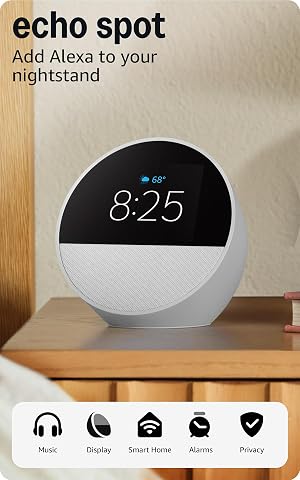
Echo Spot Smart Alarm Clock – Glacier White
- ✔ Dimensions: 4.5 × 4.1 × 4.4 inches
- ✔ Weight: 14.3 oz
- ✔ Display: 2.83-inch touchscreen, 240 × 320 pixels
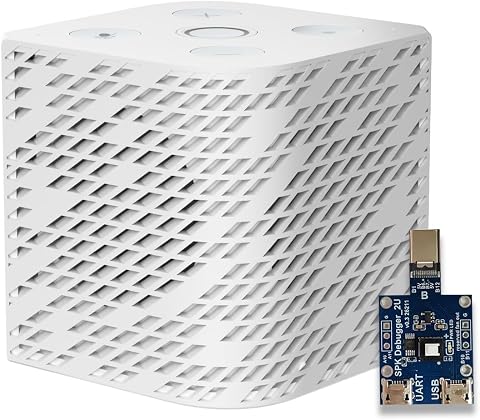
Third Reality Voice/Music Assistant Dev Edition
- ✔ Processor: Quad-core ARM A53
- ✔ Memory: 256 MB RAM
- ✔ Flash storage: 512 MB
For a home with a mix of lights, plugs, cameras, and appliances, Alexa is often the easier starting point because more manufacturers support it. Google Assistant can be the better match for Android users and people who regularly ask questions tied to Google’s services. Neither choice guarantees that every device or feature will work: compatibility varies by model, region, and product generation. The practical decision is whether you value wider device choice or a closer connection to the services you already use.
At a Glance
| Criteria | Amazon Alexa | Google Assistant | Winner |
|---|---|---|---|
| Smart home device compatibility | Broad support across many third-party smart home brands; check the exact device and feature support before buying. | Good coverage of mainstream devices, though support can be less broad than Alexa for some brands and product types. | A |
| Voice queries and information | Handles common questions and tasks well, with useful Amazon shopping and service links. | Often a strong fit for everyday questions and requests connected to Google services. | B |
| Routines and household control | Flexible routines can link supported devices and timed or voice-triggered actions. | Supports routines and linked smart home actions; exact controls depend on device and setup. | Depends |
| Phone and service integration | Strongest with Amazon services and Alexa-enabled devices; phone integration varies by device. | Strong connection to Android and Google services such as Calendar and Maps. | B |
| Privacy and account controls | Offers voice history and privacy controls, but settings and data practices merit review. | Provides account and activity controls through Google settings; review voice and activity history options. | Depends |
| Hardware choice and cost | Many Echo devices and third-party speakers across a wide range of prices. | Available on Google and partner hardware; choice and availability depend on region and product generation. | A |
| Long-term ecosystem fit | Best suited to homes that prioritize device choice and already use Amazon services. | Best suited to Android households and people who rely on Google services. | Depends |
Echo Dot Max with Amazon Smart Plug Bundle
For households building around voice control, the Echo Dot Max bundle makes the broadest case in this group. Alexa provides the familiar voice interface, and its built-in hub supports Zigbee, Matter, and Thread. That gives it a more substantial smart home role than the Echo Spot, whose strongest advantage is its bedside screen, and a more ready-made consumer setup than Third Reality’s developer-oriented Home Assistant speaker.The included Amazon Smart Plug provides a straightforward first device to control, while the Max’s Omnisense sensors add a more proactive angle. Temperature, ambient light, and presence detection can inform automations, so routines can respond to room conditions rather than only a spoken command or schedule. Its woofer and tweeter also make it the clear audio choice here: stronger bass and room-filling sound are useful when the assistant doubles as a primary speaker. Wi-Fi 6E and eero extension add connectivity options, though eero extension requires a compatible router and account setup.We would choose it when smart home breadth and richer sound matter more than a visual clock. The Echo Spot is a better bedside display, and Third Reality is better suited to owners who want an open Home Assistant platform. The Max remains tied to Alexa, and the listed macOS hands-free limitation and Bluetooth compatibility caveats matter for some households. Its sensor and hub advantages also depend on the devices and routines a buyer actually uses; they do not guarantee that every accessory will work seamlessly.
Pros:
- Built-in hub supports Zigbee, Matter, and Thread devices.
- Temperature, light, and presence sensors can inform more responsive routines.
- Two-driver audio is designed for fuller sound than a compact clock speaker.
- Includes an Amazon Smart Plug for voice control of a basic connected appliance.
Cons:
- eero Wi-Fi extension requires a compatible eero router and account setup.
- Alexa ecosystem dependence may not suit Home Assistant-first households.
- Hands-free macOS voice control and some PIN-code Bluetooth speakers are unsupported.
Best for: Alexa households that want a speaker with a built-in multi-protocol smart home hub, richer audio, and sensor-based automation potential.
Not ideal for: Buyers who want a visible bedside clock, prioritize an open Home Assistant platform, or do not use Alexa-compatible devices and routines.
Bottom line: Choose the Echo Dot Max bundle when broad device support, sensor-driven routines, and stronger speaker performance matter more than a bedside display.
“Choose the Echo Dot Max bundle when broad device support, sensor-driven routines, and stronger speaker performance matter more than a bedside display.”
Echo Spot Smart Alarm Clock – Glacier White
The Echo Spot earns its place by making an assistant easy to glance at and use from bed. Its 2.83-inch customizable touch display shows the time, weather, or song information, giving it a clearer bedside purpose than the screen-free Echo Dot Max. Alexa handles spoken requests and routines, while the full-range speaker offers more than a simple alarm tone. For a bedroom where a visible clock is the priority, that combination is more useful than the Max’s extra hub features.It is a more compact and approachable Alexa option, but it should not be mistaken for the lineup’s most capable smart home controller. Unlike the Echo Dot Max, the Spot’s description does not list a Zigbee, Matter, or Thread hub or presence sensors. Its eero Built-in feature can extend Wi-Fi coverage by up to 1,000 square feet, but only with a compatible eero router, and the stated extension speeds and device support are limited. That feature is a bonus for the right network, not a reason to buy it as a general-purpose mesh replacement.The lack of a camera suits buyers who want a bedroom device without video-calling hardware, although it also rules out camera-based calls. Bluetooth has further limitations, including no hands-free support for Mac OS X and incompatibility with some speakers that require a PIN. Compared with Third Reality, the Spot is more polished as an everyday alarm and Alexa speaker; compared with the Max bundle, it is easier to justify when the screen matters more than hub depth.
Pros:
- Customizable display presents time, weather, and song details at a glance.
- Alexa supports hands-free control of compatible devices, music, and routines.
- Full-range speaker is suited to alarms, voice responses, and casual listening.
- eero extension can add coverage when paired with a compatible eero router.
Cons:
- No camera for video calls.
- The listed features do not include the Max’s Zigbee, Matter, Thread hub, or sensors.
- Some Bluetooth speakers requiring a PIN are incompatible, and Mac OS X hands-free use is unsupported.
Best for: Alexa users who want a compact bedroom assistant with a visible clock, weather, music details, and a capable built-in speaker.
Not ideal for: Buyers seeking a broad built-in smart home hub, sensor-based automation, camera calling, or an open Home Assistant platform.
Bottom line: Pick the Echo Spot when an Alexa-powered bedside clock and speaker are more useful to you than the Echo Dot Max’s hub and sensor features.
“Pick the Echo Spot when an Alexa-powered bedside clock and speaker are more useful to you than the Echo Dot Max’s hub and sensor features.”
Third Reality Voice/Music Assistant Dev Edition
Third Reality’s Dev Edition is the specialist in this roundup. It arrives with Home Assistant Voice Assistant and Music Assistant preloaded, so its central appeal is a direct fit for people already building around Home Assistant. Its Linux platform supports firmware flashing, live logs, and on-device editing, which gives technically inclined owners more room to inspect and adjust the system than the Echo Spot or Echo Dot Max do. That openness makes it the most distinctive pick here, even though it is less broadly equipped as an everyday speaker.The compact square enclosure includes dual digital microphones for voice capture and a 3 W speaker for spoken responses and music. Those basics allow it to serve as an in-room voice endpoint without depending on a separate speaker for every interaction. But the contrast with the Echo Dot Max is substantial: Third Reality does not list a Zigbee, Matter, or Thread hub, sensor suite, or eero extension. Its value is in fitting into a Home Assistant workflow, not in adding the broadest set of built-in smart home functions.We would skip it if a buyer expects a finished Alexa-style appliance with wide wireless connectivity. It only supports 2.4 GHz Wi-Fi, has 256 MB of RAM and 512 MB of flash storage, and offers no Bluetooth or additional connectivity options. Those constraints make it a focused endpoint rather than a platform for demanding applications. Compared with the screen-equipped Echo Spot, it gives up the at-a-glance clock; compared with the Max bundle, it gives up richer audio and built-in hub features. In return, it offers more direct software control for Home Assistant owners.
Pros:
- Home Assistant Voice Assistant and Music Assistant are preloaded.
- Open Linux platform supports firmware flashing, live logs, and on-device editing.
- Dual digital microphones support voice capture and wake-word interaction.
- Integrated 3 W speaker handles voice responses and basic music playback.
Cons:
- 2.4 GHz Wi-Fi only, with no Bluetooth or additional listed connectivity.
- 256 MB RAM and 512 MB flash limit headroom for advanced applications.
- No display, listed smart home hub, or sensor features like the Echo Dot Max.
Best for: Home Assistant users comfortable with Linux who want a compact voice and music endpoint they can inspect, configure, and potentially flash.
Not ideal for: Buyers seeking a turnkey Alexa assistant, broad Wi-Fi support, Bluetooth playback, a screen, or a built-in multi-protocol smart home hub.
Bottom line: Choose Third Reality when an open Home Assistant voice endpoint matters more than the broader connectivity and consumer polish of either Echo.
“Choose Third Reality when an open Home Assistant voice endpoint matters more than the broader connectivity and consumer polish of either Echo.”
As an Amazon Associate we earn from qualifying purchases.
Key Differences
The clearest practical advantage belongs to Alexa when a home contains, or will gradually add, devices from several manufacturers. Many smart home products advertise Alexa support, so choosing Alexa can leave more room to shop by price, design, or feature set. That breadth is not a guarantee of equal control: a product may support basic voice commands but require its own app for advanced settings. Check the exact model and supported functions before purchasing.
Google Assistant makes more sense when the household already depends on Google services. Asking about a calendar entry, getting directions, or using an Android phone alongside a speaker can feel more connected than building those tasks around Amazon. Routines, privacy settings, speaker features, and device support can change across product generations and regions, so a buyer should compare the specific hardware on offer. The deciding factor is usually the household’s existing devices and services, not a small difference in how either assistant answers a single question.
Detailed Comparison
Smart home device compatibility (Amazon Alexa wins — moderate)
Alexa wins by a moderate margin for shoppers assembling a varied smart home. More manufacturers have historically listed Alexa support, which can make it easier to find compatible plugs, lights, locks, and appliances. Google Assistant covers many popular products, but support may be narrower for a particular brand or feature. In either case, compatibility labels can hide limits: confirm whether voice control includes the functions you need, such as dimming, changing modes, or checking a sensor. Alexa is the safer default when device variety is the top priority.
Voice queries and information (Google Assistant wins — moderate)
Google Assistant has a moderate advantage for people who ask frequent general questions or want answers connected to Google services. Its fit with Google Search and services can make requests about events, places, and daily information convenient. Alexa handles common requests well and can be particularly handy for Amazon shopping and services. The difference matters most when an assistant is used as a daily information tool; for simple commands such as turning off lights or setting a timer, it is minor.
Routines and household control (moderate difference)
This is a close comparison, with the winner depending on the devices and routine you want to build. Both systems can connect supported devices to voice commands and scheduled actions, but available triggers and controls vary by product, software, and region. Alexa’s wider brand support can give it an advantage in mixed-device homes; Google’s routines may be more appealing to households already using its services. Before committing, check that the specific actions you want are supported, particularly if you expect one command to control products from several brands.
Phone and service integration (Google Assistant wins — moderate)
Google Assistant wins by a moderate margin for Android users who already keep calendars, maps, contacts, or other everyday information in Google services. Using the same account ecosystem can reduce setup and make voice requests more useful. Alexa has a stronger connection to Amazon services and can suit households centered on Echo devices and Amazon shopping. If nobody in the home uses Google services, this advantage shrinks; if most household members carry Android phones, Google becomes the more natural fit.
Privacy and account controls (moderate difference)
There is no universal winner. Both assistants involve microphones, account-linked services, and settings that let users review or manage some activity. The controls and their locations can change, and each company’s data practices differ. Buyers should review voice recording, history deletion, personalization, and household sharing settings for the specific account and device they plan to use. This is a meaningful choice for privacy-conscious households, but it requires looking at current settings rather than relying on a broad claim that one assistant is private by default.
Hardware choice and cost (Amazon Alexa wins — minor)
Alexa wins by a minor to moderate margin for sheer choice: the Echo line and third-party Alexa-compatible speakers offer buyers multiple form factors and price points. Google hardware and partner options can also cover common needs, but availability and selection vary by region and generation. Neither assistant is inherently more valuable because of its speaker price alone. Compare sound quality, display needs, microphone placement, and ongoing device support. A low-cost speaker is a poor bargain if it lacks the features or compatibility the household expects.
Long-term ecosystem fit (major difference)
This depends on which services and devices are already part of the home. Alexa is the stronger fit when the main goal is adding a broad mix of smart home products and the household uses Amazon services. Google Assistant is stronger when Android phones and Google services are already central. Switching assistants later may mean rebuilding routines and checking device links, so the most useful choice is usually the one that matches the household’s existing habits. This is a major practical factor, even though neither platform wins for every buyer.
Amazon Alexa: Pros and Cons
Pros:
- Broad compatibility with many smart home brands.
- A wide range of Echo and partner hardware options.
- Good fit for households that use Amazon services.
Cons:
- Some supported devices expose only basic controls through voice.
- Google services and Android workflows may feel less integrated.
- Buyers should review Amazon account and voice history settings.
Google Assistant: Pros and Cons
Pros:
- Strong fit with Android phones and Google services.
- Convenient for many everyday information and calendar requests.
- Supports many mainstream smart home devices.
Cons:
- Support for particular brands or features may be narrower than Alexa’s.
- Hardware availability and selection vary by region and generation.
- Buyers should review Google account activity and voice controls.
Who Should Choose What
Choose Amazon Alexa if:
- You are buying devices from several smart home brands and want the broadest chance of voice compatibility.
- Your home already uses Echo speakers or Amazon services.
- You want a low-cost entry point with several speaker and display styles to compare.
Choose Google Assistant if:
- Most household members use Android phones and Google services.
- You expect to use voice requests for calendar, maps, and general information as often as device control.
- Your existing smart home devices support the Google features you need.
Skip both if: Skip both if you want local control without relying on cloud accounts or voice recordings, or if your chosen devices work better through a different ecosystem or dedicated hub.
Value for Money
Alexa is often the better value for a buyer who wants broad device choice and an affordable way to begin, especially if a compatible Echo model meets the household’s needs. Paying more for Google hardware is worthwhile when its particular speaker features, Android integration, or Google service links will be used regularly. The assistant alone does not justify a premium: compare the actual device, its sound or display quality, supported routines, and expected software support. Check current prices and compatibility for the exact models, since hardware and availability change over time.
Final Verdict
For most people building a smart home from a mix of brands, start with Amazon Alexa: its wider device support and range of hardware make it the more flexible default. Choose Google Assistant if Android and Google services already shape your daily routine; that integration can matter more than having the broadest catalog. Before buying either system, verify the exact device models, voice features, and privacy controls. The biggest deciding factor is whether your household needs wider smart home compatibility or closer integration with Google services.
Frequently Asked Questions
Is Alexa or Google Assistant better for a smart home?
Alexa is usually the better starting point for a home with devices from several brands, because its compatibility is often broader. Google Assistant is a better fit when Android and Google services are central. Check support for the exact devices and controls you plan to use.
Do Alexa and Google Assistant work with the same smart devices?
Many popular products support both, but the overlap is not complete and features can differ. A product may allow basic voice commands on one platform while reserving some settings for its own app. Check the manufacturer’s compatibility details for the exact model.
Should Android users choose Google Assistant?
Often, yes, especially if they use Google Calendar, Maps, or other Google services. Alexa can still be a good choice if the household prioritizes broad smart home device support or already owns Echo hardware.
Is it worth paying more for a voice assistant speaker?
Pay more when the specific speaker adds something you will use, such as better sound, a display, or tighter integration with your phone and services. For basic timers and light control, an affordable compatible speaker may be enough. Compare device features and current prices rather than assuming one assistant requires a premium.
Can I use Alexa and Google Assistant in the same home?
Yes, though maintaining two systems can mean separate routines, accounts, and device setups. It can make sense if household members prefer different services or if a device works better with one assistant. For a simpler setup, choose one as the main controller and confirm which devices it supports.
Evergreen bestsellers Picks

Ninja Creami Scoop & Swirl Ice Cream Maker – Bone & Champagne (Amazon Exclusive)

De'Longhi Rivelia Automatic Espresso Machine with Milk Frother

TCL 85-Inch QM6K QLED Mini LED 4K HDR Smart Google TV, 144Hz
As an affiliate, we earn on qualifying purchases.