TL;DR
Signal’s November 20 update adds protections against screenshots and operating-system AI assistants reading chats on supported iPhones and Android devices. The protections are on by default in the specified versions, but they do not cover every device or route by which chat content could be captured.
Signal has added default protections on supported iPhones and Android phones to limit screenshots and prevent some operating-system AI assistants from reading chats on screen. The update, announced on November 20, addresses a gap in end-to-end encryption: messages are decrypted for display on a user’s device, where screen-reading tools may be able to access them.

Get everyday essentials delivered free with Prime
- Fast, free delivery on millions of items
- Prime Video, Amazon Music and more included
- Member-only deals all year
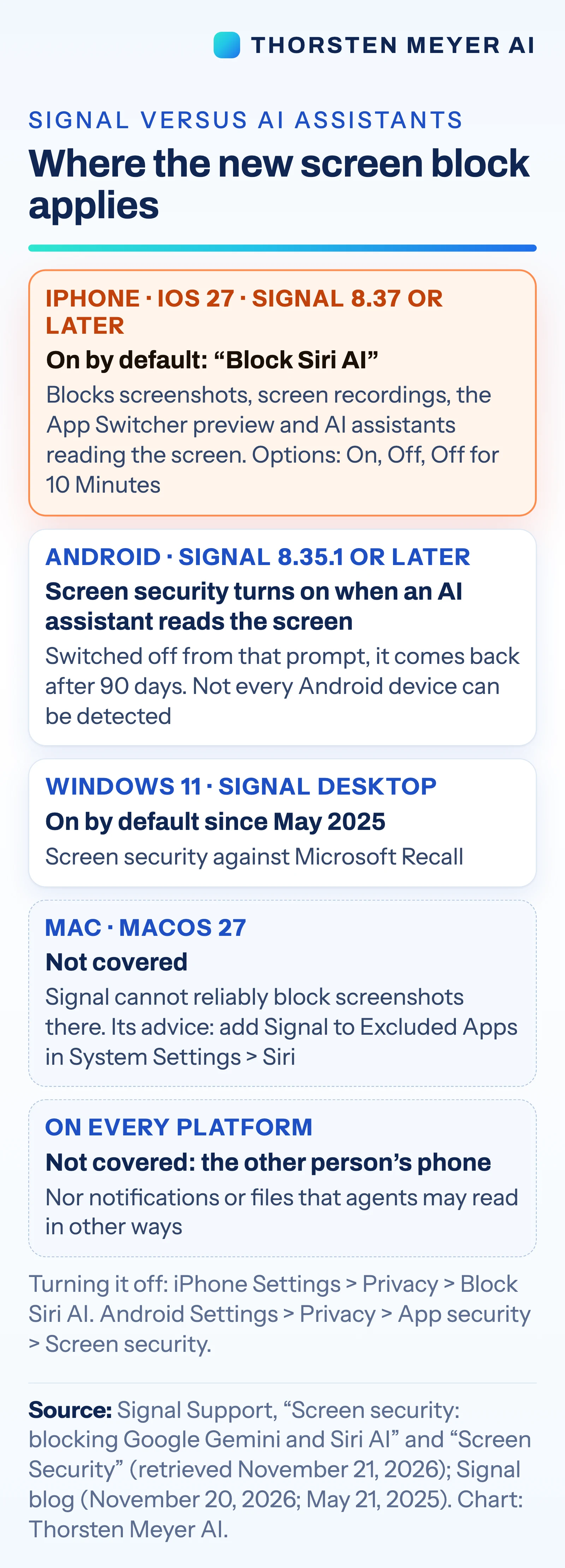
On iPhone, Signal version 8.37 or later running on iOS 27 or later adds a “Block Siri AI” setting, on by default. Signal says it blocks screenshots and screen recordings in the app, hides chats in the App Switcher and prevents on-device AI assistants from reading Signal’s screen. Users can find the control under Settings → Privacy → Block Siri AI and choose On, Off or “Off for 10 Minutes.”
On Android, Signal version 8.35.1 or later uses its “Screen security” setting. Signal says the setting turns on automatically the first time an AI assistant tries to read the screen. Users can change it under Settings → Privacy → App security → Screen security. Signal warns that turning it off may expose both the user’s chats and messages from their contacts to AI assistants.
The protections have limits. Signal says it cannot reliably block screenshots on Mac, and Android may not detect every assistant. The feature also does not cover notifications or files, and it applies only to the user’s device: it cannot prevent capture on the phone belonging to the person they are messaging.
Where Encryption Meets Screen Access
End-to-end encryption protects messages as they travel between devices and prevents Signal’s servers from reading their contents. To show a message, however, a phone decrypts it and displays it. Signal says an assistant with screen awareness could then capture information visible in the app, placing that data beyond Signal’s control.
The change matters because users may think of an encrypted conversation as protected at every stage. These settings add a barrier at the point where messages appear on screen, but they do not make every form of device-level access impossible. Signal is also asking Apple, Google and Microsoft for a documented way for apps to opt out of AI data access, according to the source material.
Products Worth Considering

Amazon Kindle Paperwhite (2024), 16 GB, 7-inch Display, Black

Jackery Explorer 300 Portable Power Station, 292Wh

Bose SoundLink Plus Portable Bluetooth Speaker, Black
As an affiliate, we earn on qualifying purchases.
Signal’s Earlier Screen Protections
This update follows Signal’s earlier response to Microsoft Recall. On May 21, 2025, Signal enabled its Screen security setting by default in Signal Desktop on Windows 11 to block Recall from capturing its chats. Signal’s account of Recall says the feature captures the screen periodically, extracts text from screenshots using optical character recognition and stores it in a searchable on-device database.
The latest change targets mobile AI features. Apple released Siri AI on September 14, 2026, describing an assistant with “onscreen awareness” that can respond to or act on screen content. The source material also identifies Google’s Gemini Intelligence as a screen-reading concern. Reuters reported the Signal update as an exclusive on November 20. The source material says Meta’s Muse agent had read Signal messages through permissions granted during setup, citing Reuters, but does not provide enough detail to independently establish the scope of that incident.
Limits of the New Safeguards
The available information does not specify which Android assistants or device configurations Signal can detect, or how often detection may fail. Signal says Mac screenshots cannot be reliably blocked, but the source material does not detail the technical limits behind that restriction.
It is also unclear how Apple, Google and Microsoft will respond to Signal’s request for a documented opt-out mechanism. The protections do not establish what happens to any data an assistant may have captured before the setting activates, and they cannot control screenshots, notifications or files outside the covered app screen.
A Request to Platform Makers
Signal says it is asking Apple, Google and Microsoft for a straightforward, documented mechanism that would let apps opt out of AI data access. The source material gives no timeline for a response or for any platform changes. For now, users can check that they have a supported Signal version, review the relevant privacy setting and consider that the person on the other end of a conversation has separate device controls.
Businesses deploying screen-reading agents may also need to account for apps that restrict access. The source material does not identify any announced changes to enterprise agent policies or provide a schedule for further Signal updates.
Key Questions
Does Signal now block every screenshot?
No. Signal says the iPhone setting blocks screenshots and screen recordings in the app on supported versions. It says it cannot reliably block screenshots on Mac, and the feature does not prevent capture on the other person’s phone.
Which iPhones get the “Block Siri AI” setting?
Signal lists version 8.37 or later on iOS 27 or later. The setting is on by default and appears under Settings → Privacy → Block Siri AI.
How does the Android protection work?
On Signal version 8.35.1 or later, Screen security turns on automatically the first time an AI assistant tries to read the screen, according to Signal. Users can find it under Settings → Privacy → App security → Screen security.
Can users turn the protection off?
Yes. The iPhone setting offers On, Off and “Off for 10 Minutes.” Android users can change Screen security in the app’s privacy settings. Signal warns that turning protection off may expose visible chat content to AI assistants.
Does end-to-end encryption prevent an AI assistant from seeing a message?
Not necessarily. Encryption protects messages in transit, but the phone decrypts them to display them. Signal’s update is intended to limit some screen capture and assistant access on supported devices; it does not cover every device or capture route.
Source: Thorsten Meyer AI