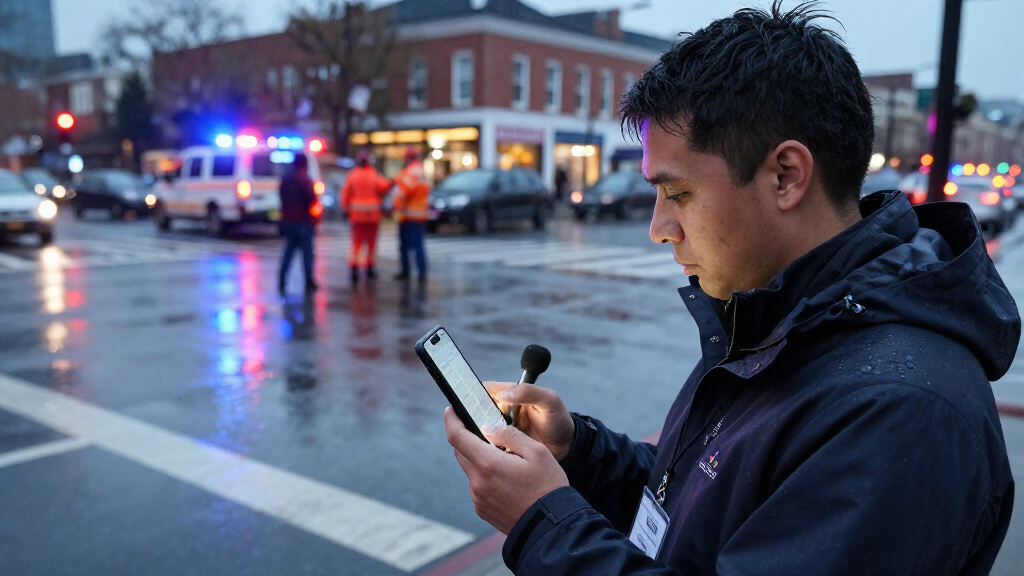
This checklist is for reporters preparing to cover breaking news in the field, where communications, power, weather protection, lighting, and file storage all need a place in the plan. Start with the conditions you expect and the equipment your assignment actually requires.

Get everyday essentials delivered free with Prime
- Fast, free delivery on millions of items
- Prime Video, Amazon Music and more included
- Member-only deals all year
The sections follow practical gear slots: satellite messaging, portable power, camera rain protection, press credentials, LED lighting, and external storage. Each product pick is paired with buying considerations; the credential section offers advice without naming a product.
Use the checklist before packing: confirm your devices and accessories are compatible, check the fit of protective gear, and decide what must stay accessible during coverage. Treat each item as one part of a complete field setup, and prioritize based on the assignment, travel, and available carrying space.
Satellite Messenger
A satellite messenger can be a useful planning slot for field reporting when an assignment may take you beyond dependable cellular coverage. The Garmin inReach Mini 3 Plus Rugged Global Satellite Communicator with T is the named pick; before choosing it, confirm that the product and its service options match your intended use. Coverage and service details matter as much as the device itself, so check current manufacturer information for the regions and features you need.
A common buying mistake is assuming that a satellite communicator will work without setup, a compatible plan, or attention to power. Confirm activation requirements, charging method, and how the device fits your reporting workflow. Check the exact model name and included accessories, and make sure its dimensions and attachment options work with your bag or clothing. Consider whether you need to carry it where it remains accessible, rather than buried under other equipment. Test the complete setup before an assignment, including the intended charging and carrying arrangements, and learn the device’s instructions before relying on it in the field.
What to look for:
- Confirm service availability and plan requirements for assignment locations.
- Check the exact model and included accessories.
- Verify charging method and compatibility with your power kit.
- Choose a carry location that keeps the device accessible.
- Review setup and operating instructions before departure.
Garmin inReach Mini 3 Plus Rugged Global Satellite Communicator with Touchscreen

The Garmin inReach Mini 3 Plus is a compact, rugged satellite communicator offering global connectivity through touchscreen texting, photo sharing, voice messaging, and emergency SOS features. It supports seamless satellite switching, smart device pairing, and location sharing, making it ideal for outdoor adventures.
Pros:
- Compact and lightweight design for portability
- Long battery life of up to 350 hours
- Global satellite coverage with seamless switching
- Supports multiple messaging and emergency features
Cons:
- Subscription required for satellite services
- Limited to outdoor and adventure use cases
- Display may be small for some users
Best for: Reporters planning coverage where cellular service may be limited
Not ideal for: Assignments where the device’s service requirements cannot be confirmed
Bottom line: Confirm regional service, setup, and charging needs before making this communicator part of your field kit.
Portable Power Station
Power planning helps reporters keep essential equipment ready during long or mobile assignments. The Jackery HomePower 3600 Plus Portable Power Station, 3584Wh, 3600W is the listed pick. Match its stated capacity and output to the devices you intend to power, and check the manufacturer’s specifications for supported connections and charging options. Device compatibility should guide the decision: list your equipment and its power needs before deciding how a station fits into the kit.
One common mistake is choosing a station by headline capacity alone without considering how it will be transported, connected, and recharged. Check dimensions, weight, outlets, and any necessary cables against your vehicle, bag, or workspace. Confirm that your camera, lights, laptop, and other planned devices can connect as intended; do not assume every plug or charging method is included. Consider where the station will sit during use and how you will protect connections from weather and crowd movement. Plan the full power path from station to device, and check the manual for operating conditions and charging guidance before relying on it for a reporting day.
What to look for:
- Compare the station’s output and connections with each device.
- Check dimensions and weight against transport and storage plans.
- Confirm which cables or adapters are included or required.
- Review available recharge methods for the assignment.
- Plan a stable, protected location for operation.
Jackery HomePower 3600 Plus Portable Power Station, 3584Wh, 3600W

This portable power station has a 3584Wh capacity, 3600W output, and dual-voltage support when units are connected in parallel. Its LFP battery is designed for 6,000 cycles, and the wheeled, telescoping-handle design makes it easier to move.
Pros:
- 3584Wh capacity with 3600W output for home backup use
- LFP battery rated for 6,000 cycles
- Supports AC, solar, gas generator, and hybrid AC+DC charging
- Wheels and a telescoping handle make it easier to move
Cons:
- Weighs 77.2 pounds
- 240V output requires units to be connected in parallel
- Solar panel is optional
Best for: Crews carrying several devices that need planned charging
Not ideal for: Reporters whose transport or connection needs do not suit a station
Bottom line: Match output, connections, recharge options, and transport requirements to the equipment you will actually use.
Weatherproof Camera Cover
Rain protection can help keep a camera usable when reporting conditions turn wet. The Think Tank Photo Emergency Rain Cover for DSLR and Mirrorless Cameras, is the named option. Check that the cover is designed for your particular camera setup, including lens dimensions and any attached accessories. Fit is essential: a cover that does not accommodate the camera and lens you carry can interfere with access and operation.
A frequent buying mistake is treating “DSLR and mirrorless” as confirmation that every body and lens combination will fit. Review the manufacturer’s sizing guidance and compare it with your camera, longest lens, viewfinder, and strap arrangement. Consider whether you can reach the controls and view the display while the cover is fitted, and whether the cover can be packed where it is quick to retrieve. Check the product’s stated weather protection and care instructions; do not assume a camera cover makes equipment suitable for every exposure. Practice fitting it before the assignment so you can make adjustments calmly, and inspect how it handles your actual camera configuration.
What to look for:
- Compare the cover’s sizing guidance with your body and lens.
- Check fit with accessories, strap, and viewfinder in place.
- Confirm access to camera controls and display.
- Review stated protection and care instructions.
- Practice fitting and packing the cover before the assignment.
Think Tank Photo Emergency Rain Cover for DSLR and Mirrorless Cameras, Medium (R

This rain cover provides extreme protection for DSLR and mirrorless cameras with 70-200mm lenses in heavy rain or dusty conditions. It features a seam-sealed design, a large viewing window, and compresses into a compact pouch for easy transport.
Pros:
- Provides excellent protection in harsh weather conditions
- Compact and portable design
- Large window for easy LCD viewing and controls
Cons:
- May be bulky for small cameras
- Limited to medium-sized lenses
- Requires careful fitting to ensure waterproof seal
Best for: Photographers who may work in wet conditions
Not ideal for: Camera and lens combinations outside the cover’s stated fit
Bottom line: Confirm the cover fits your full camera setup and practice using it before field coverage.
Press Credential Holder
A credential holder belongs on the checklist because identification needs to remain easy to present and protected during active coverage. Select a format that suits the credential issued for your assignment and the way you will carry it. Visibility and access are practical priorities: credentials that are hard to retrieve or read can slow routine check-ins.
A common mistake is buying a holder before checking the credential’s dimensions, orientation, and any rules set by the issuing organization or event. Compare the holder opening with the actual card, including any sleeve or backing, and check whether the credential must be displayed in a particular way. Consider how it attaches to clothing or a bag, whether that placement works with your reporting layers, and how it will fare in expected weather. Avoid covering required text or photographs with clips, folds, or glare. Follow organizer guidance and test the holder with the issued credential before leaving, so it stays secure and readable while you move.
What to look for:
- Check credential dimensions and orientation before selecting a holder.
- Follow display and access rules from the issuing organization.
- Keep required text and photographs visible.
- Choose an attachment that suits clothing and carrying habits.
- Test security and readability with the actual credential.
Portable LED Panel
Portable lighting can give a reporting kit another option for interviews and other footage where available light is not enough. The GVM 2-Pack Bi-Color LED Video Lighting Kit with App Control is the listed pick. Check the manufacturer’s specifications for the panels, control method, included stands or mounts, and power arrangements. Compatibility with your shoot matters: consider where you will place two lights and how they fit your camera and audio workflow.
A common mistake is selecting a kit without accounting for setup time, mounting, and transport. Check whether the included supports suit your planned locations, and confirm what additional stands, batteries, or cables may be needed. Review how app control works and whether your phone and workflow can support it; check the manufacturer’s instructions rather than assuming controls or accessories. Consider how the kit packs alongside cameras and other equipment, and whether you can position lights without creating hazards in crowded or fast-moving spaces. Rehearse placement and operation before deployment, including how you will power and stow the kit between shots.
What to look for:
- Review panel specifications and included accessories.
- Confirm mounting and support options for planned locations.
- Check power needs and whether batteries or cables are included.
- Verify app control requirements for your phone and workflow.
- Plan transport, setup time, and safe placement.
GVM 2-Pack Bi-Color LED Video Lighting Kit with App Control
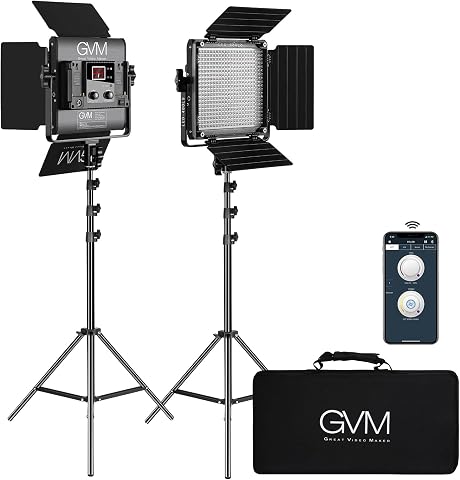
This kit includes two 29 W LED panels with app control, adjustable 2300–6800 K color temperature, and 10–100% brightness. Each panel has 480 LEDs, CRI and TLCI ratings of 97+, and AC or optional Sony F550, F750, or F970 battery power; the kit also includes stands, barndoors, soft diffusers, adapters, and a carry bag.
Pros:
- Adjustable color temperature and brightness
- App control and digital display
- High CRI and TLCI ratings for color rendering
- Includes stands, diffusers, barndoors, adapters, and carry bag
Cons:
- Batteries are not included
Best for: Crews who want a two-panel lighting option for video
Not ideal for: Assignments where setup, mounting, or power needs cannot be accommodated
Bottom line: Check the control method, supports, power, and packing needs before adding this lighting kit.
Rugged External SSD
External storage gives a reporting workflow a place to copy and carry recorded files. The SanDisk Extreme PRO Portable SSD, 4TB is the named pick. Confirm that the drive connects to your computer and other intended devices, and check the manufacturer’s details for included cables and operating requirements. Workflow compatibility is key: verify the connection type before an assignment so transfers do not depend on an unexpected adapter.
A common buying mistake is assuming the drive’s stated capacity or rugged positioning removes the need for a file plan. Decide how you will name, organize, and back up footage, and confirm the available space against the material you expect to capture. Review the drive’s connection and format requirements for each computer you will use. Check the product’s stated durability guidance and handle it accordingly; no portable drive should be treated as the only copy of important reporting files. Plan a second copy when the assignment calls for it, and test a transfer before departure to confirm the drive appears and files can be accessed.
What to look for:
- Confirm connection type and compatibility with every intended device.
- Check included cables and adapter needs.
- Estimate storage needs for the planned footage and files.
- Review formatting and operating requirements.
- Test transfers and plan a separate backup for important material.
SanDisk Extreme PRO Portable SSD, 4TB

A portable 4TB SSD designed for demanding video and photography workflows, with read speeds up to 4000 MB/s and average sustained write speeds of 3100 MB/s. It has an IP65 rating, drop protection up to 3 meters, and password protection with 256-bit AES encryption.
Pros:
- High read and sustained write speeds
- IP65 water and dust resistance
- Drop protection up to 3 meters
- Password protection with 256-bit AES encryption
Cons:
- Actual performance may vary depending on the host device and usage conditions
- Password protection requires a software download
Best for: Reporters who need portable file storage in the field
Not ideal for: Workflows without a compatible connection or a backup plan
Bottom line: Confirm compatibility, test a transfer, and decide how important files will be backed up.
Build the kit in a practical order: first identify the assignment’s communication and power needs, then protect the camera and keep credentials accessible. Add lighting and storage according to the work you expect to produce. Prioritize essential requirements and confirm fit, connections, service, and carrying arrangements before purchasing.
A reliable checklist starts with your own equipment and the conditions you expect to face. Review each item against the actual assignment, pack it where it is usable, and rehearse the parts that need setup. Thoughtful preparation makes it easier to focus on the reporting when the news is moving quickly.