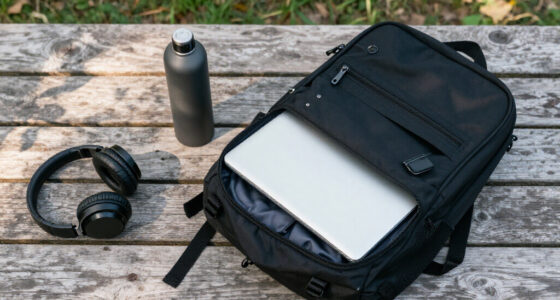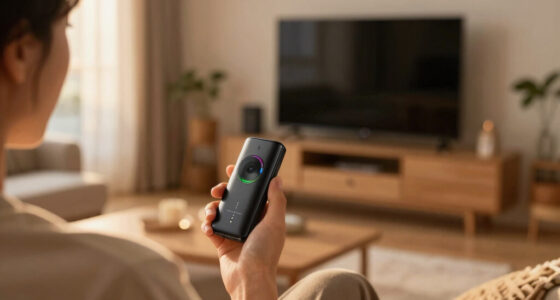

This checklist is for reporters who use a smartphone to capture interviews, standups, and field footage. It covers gear for steady video, clearer audio, added light, power, and transport, with each pick matched to a practical role. Start with the reporting work you do most often, then build around it.

Get everyday essentials delivered free with Prime
- Fast, free delivery on millions of items
- Prime Video, Amazon Music and more included
- Member-only deals all year
The sections follow a mobile reporting workflow: stabilize the phone, capture spoken audio, light a scene, record field sound, charge a camera battery, and carry equipment. Each section explains why that slot matters and what to check before choosing the named pick. Think in terms of your full setup, since one item may need to work alongside gear you already own.
Use the look-for points as a quick checklist, then confirm fit and compatibility with the exact devices and accessories you plan to bring. Pay close attention to phone support, microphone connections, battery type, and how much equipment you need to carry. Verify the details with the manufacturer before relying on a piece of gear for an assignment.
Smartphone Gimbal
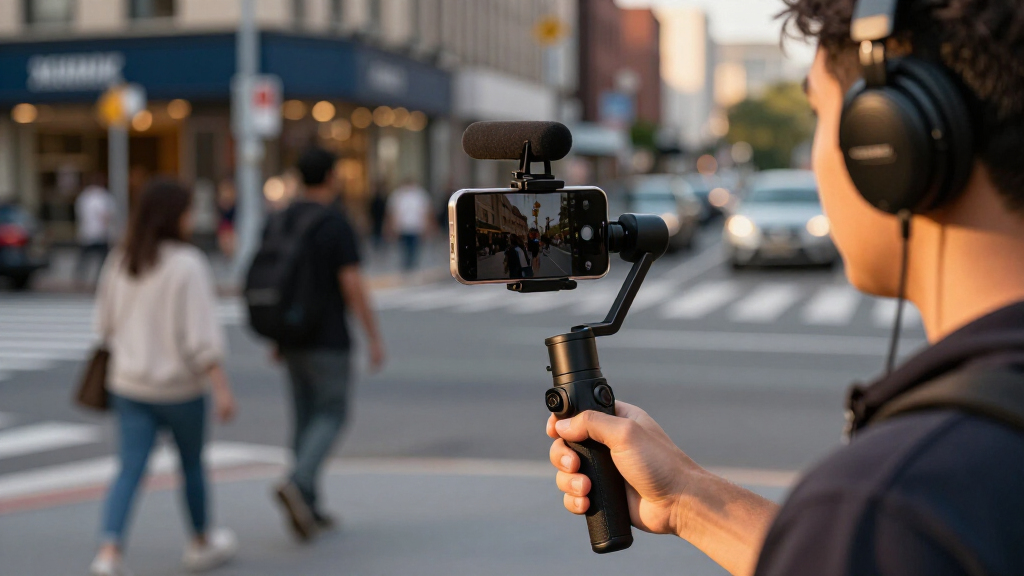
A gimbal can help keep smartphone footage steady while you move through a scene or record a standup. For mobile reporting, that can make handheld clips easier to watch and give you more control over framing. The named pick is the Hohem iSteady M7 Gimbal Stabilizer for iPhone, so the first question is whether your phone and its case fit the gimbal’s supported setup. Check the phone fit first, including the dimensions and weight with any case or add-on attached.
A common buying mistake is assuming every phone accessory will work with a gimbal. A clip-on microphone receiver, light, or bulky case can affect balance or interfere with movement. Check how the gimbal is controlled and whether the operating steps suit your reporting style, especially if you need to start recording quickly or adjust framing while speaking. Confirm the product’s stated compatibility and operating requirements before an assignment. Test the complete phone rig with the accessories you expect to use, and practice balancing and handling it before relying on it in the field.
What to look for:
- Confirm compatibility with your iPhone model and case.
- Check supported phone dimensions and weight.
- See whether attached accessories interfere with balance or movement.
- Review controls and setup steps for your recording routine.
- Practice with the complete rig before field use.
Hohem iSteady M7 Gimbal Stabilizer for iPhone

The Hohem iSteady M7 is a 3-axis gimbal stabilizer designed for iPhones, featuring a detachable remote with a full-color touchscreen, built-in extension pole, RGB and CCT fill light, and 12-hour battery life. It supports seamless remote control of brightness and color temperature, enabling creative shots from various angles, including aerial and pet’s eye views.
Pros:
- Includes a full-color touchscreen remote for easy control
- Supports creative shooting angles with extension pole
- Built-in RGB and CCT fill light for versatile illumination
- Long battery life of 12 hours
Cons:
- Primarily designed for iPhones, limited support for other devices
- May be complex for beginners to operate
Best for: iPhone reporters who want a dedicated stabilizer for mobile footage
Not ideal for: Anyone whose phone or attached accessories fall outside the verified fit
Bottom line: Confirm your phone and accessories fit, then practice operating the gimbal before taking it on assignment.
Wireless Lavalier Microphone
Interview audio is easier to use when the reporter and subject can speak naturally without crowding the phone or camera microphone. A wireless lavalier system gives you a wearable microphone option, and the Shure BLX14/CVL Wireless Lavalier Microphone System, H10 Band is the pick for this slot. Before buying, verify how its receiver connects to the device you use to record and whether you have any required cables or adapters. Connection compatibility comes first; a wireless system is only useful when it works with your recording chain.
Do not assume that a wireless microphone pairs directly with every smartphone or camera. Check the system’s stated band and operating requirements for your location and intended use, along with what is included in the package. Consider how you will position the microphone on different clothing and where you will place the receiver during a standup or interview. Wind, fabric movement, and handling noise can affect a recording, so plan a short sound check before the conversation begins. Test the whole signal path—mic, transmitter, receiver, adapters, and recording device—before you leave for the field.
What to look for:
- Verify receiver connections for your phone or camera.
- Check whether separate cables or adapters are required.
- Confirm the H10 band suits your intended location and use.
- Review what transmitters, receiver, microphone, and accessories are included.
- Make a recording test with the full setup and typical clothing.
Shure BLX14/CVL Wireless Lavalier Microphone System, H10 Band

This wireless lavalier system includes a single-channel receiver, bodypack transmitter, and cardioid clip-on microphone with windscreen for hands-free speech capture. It provides up to 300 ft (100 m) of line-of-sight range and up to 14 hours of operation on two AA batteries under typical conditions.
Pros:
- Includes the receiver, transmitter, and lavalier microphone for a complete setup
- Up to 14 hours of operation on two AA batteries
- Hands-free microphone with discreet clip-on placement
- Supports up to 12 compatible systems per band
Cons:
- The listed UHF frequency band may not be authorized in every region
- The stated range is line-of-sight and based on typical conditions
Best for: Reporters whose recording device supports the system’s receiver connection
Not ideal for: Anyone who needs a plug-and-play phone mic without checking adapters
Bottom line: Confirm the band, included components, and recording-device connection before relying on this system.
Portable LED Video Light
Available light can change quickly during a field report, and a portable panel gives you another way to shape the scene. The Godox Litemons LP600R 60W RGB LED Light Panel 2-Light Kit is the listed choice for this slot. Before planning around two lights, check the kit contents and how the panels are powered, mounted, and controlled. Plan around the actual kit and the stands, batteries, or other support pieces you will need to bring.
A common mistake is choosing a light based on its feature list without considering setup time and the reporting location. Two panels may be useful for a planned interview, but carrying and positioning them can be cumbersome when you are moving quickly. Check dimensions, power options, controls, and the product’s stated color and brightness capabilities. Confirm that any stands or mounts you plan to use are compatible and that the light can be positioned safely without obstructing the scene. Match the light to the assignment: a quick standup has different setup demands from a controlled interview. Practice adjusting and packing the lights before you depend on them outdoors or in a tight space.
What to look for:
- Check exact kit contents, including power supplies and mounting items.
- Confirm panel dimensions and how you will transport two lights.
- Review stated power options and operating controls.
- Verify compatibility with your stands, mounts, and other supports.
- Practice setup in a space similar to your reporting location.
Godox Litemons LP600R 60W RGB LED Light Panel 2-Light Kit
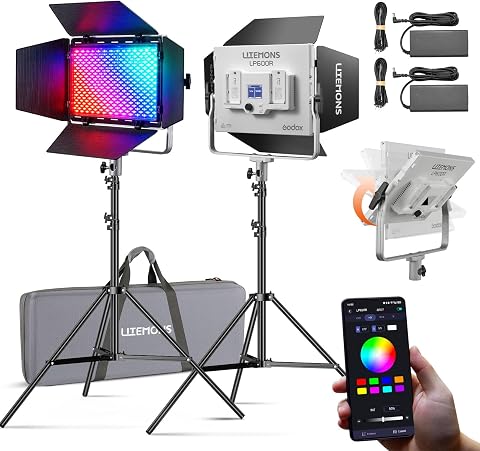
This kit includes two RGB LED panels with stands, yokes, barndoors, power adapters, cords, and a carry bag. Each panel offers an 1800K–10000K color temperature range, 14 lighting effects, app control, and AC or NP-F battery power.
Pros:
- Wide 1800K–10000K color temperature range and full RGB spectrum
- 14 built-in lighting effects
- App control with adjustable brightness
- Includes two panels and a range of setup accessories
Cons:
- Requires two NP-F batteries per panel for battery operation; batteries may need to be purchased separately
- Lightweight stands are recommended primarily for indoor studio use
Best for: Reporters who can plan time and space for a two-light setup
Not ideal for: Anyone who needs the smallest possible grab-and-go lighting setup
Bottom line: Check power, mounting, and kit contents, then make sure the two panels suit your assignment workflow.
Field Audio Recorder
A dedicated recorder can give a reporting kit a separate place to capture field audio. The Zoom F3 Professional 2-Channel Field Recorder is the pick for this slot, and its stated two-channel format makes it important to plan which sources you want to record. Check the recorder’s inputs and supported connections against your microphones, cables, and other audio gear. Map your audio connections before choosing how it fits into your kit.
Do not assume that a recorder will accept every microphone directly or that its files will drop into your editing workflow without preparation. Verify supported media, power requirements, file formats, and the controls you will need to use in the field. Consider whether you need to monitor audio while recording and how you will keep the recorder accessible without adding cable strain or handling noise. A compact recorder can still require compatible microphones, storage, cables, and a reliable way to secure it. Test a complete recording and transfer before an assignment, including playback and importing a sample file into your editing setup.
What to look for:
- Verify input and cable compatibility with your microphones.
- Check supported recording media and power requirements.
- Review file formats and transfer steps for your editing workflow.
- Confirm how you will monitor and secure the recorder in use.
- Record, play back, and transfer a sample before field use.
Zoom F3 Professional 2-Channel Field Recorder
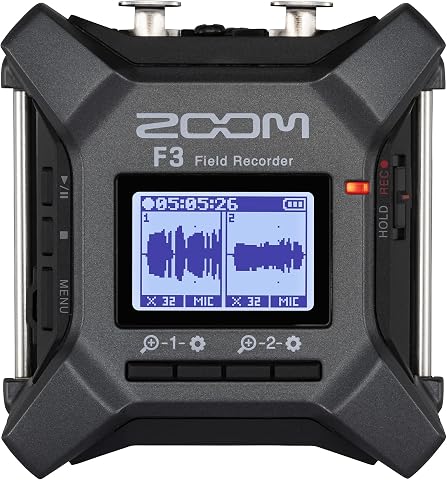
The Zoom F3 records two-channel audio in 32-bit float WAV format, helping capture quiet dialogue and sudden peaks without manual level adjustments. It has two locking XLR/TRS inputs, low-noise preamps, wireless control, and flexible battery or USB power options for field and location recording.
Pros:
- 32-bit float recording handles a wide range of audio levels
- Two locking inputs help keep connections secure
- Low-noise preamps support clean recordings
- Flexible battery and USB power options
Cons:
- Requires two AA batteries for battery-powered operation
- Built-in storage is not specified; recording uses MicroSD
Best for: Reporters who want a separate recorder for compatible audio sources
Not ideal for: Anyone who expects a recorder to connect directly to every microphone
Bottom line: Match inputs, power, storage, and file transfer to your existing audio workflow.
Camera Battery Charger
A camera battery charger belongs in a mobile kit when your camera relies on removable batteries and you need a way to recharge them between assignments. The named pick is the Sony BC-TRW W Series Battery Charger. Its name identifies the W Series, so verify the exact battery model used by your camera before buying. Match the battery model exactly; a charger for a different series may not serve your camera.
A frequent mistake is checking only the camera brand and overlooking the battery designation. Confirm the battery’s model number on the battery itself or in the camera documentation, then check the charger’s stated compatibility. Review how the charger connects to power and whether the cable or power adapter you need is included. Consider where you will charge during a reporting day and how you will keep a charged battery separate from an empty one. Build a simple charging routine around your camera and assignment schedule, and test the charger with the intended battery before you travel. This pick is useful only when its compatibility and power setup match your gear.
What to look for:
- Confirm your camera battery is a supported W Series model.
- Check the battery model number against the charger’s documentation.
- Review included cables, adapters, and power requirements.
- Consider where you can safely charge during an assignment.
- Test charging with the intended battery before travel.
Sony BC-TRW W Series Battery Charger

This compact, universal voltage battery charger is designed for traveling, featuring a retractable plug and quick charging for NP-FW50 batteries.
Pros:
- Compact and portable design ideal for travel
- Universal voltage for worldwide use
- Quick charging capability
Cons:
- Limited to NP-FW50 batteries
- No detailed charging time information
Best for: Reporters whose cameras use a supported Sony W Series battery
Not ideal for: Anyone whose camera uses another battery series or an unverified model
Bottom line: Check the exact battery designation and included power accessories before packing this charger.
Weatherproof Camera Backpack
Transport matters when a reporting kit includes camera gear and accessories that need to move between locations. The listed pick is a Weatherproof Hard Case with Wheels, IP67 Waterproof, Stackable Trolley. Its hard-case and wheeled design suggest a different carrying routine from a backpack, so consider how you travel and whether rolling equipment suits your route. Choose for your actual route, including stairs, uneven ground, and the distance from vehicle to location.
Do not assume that a weatherproof rating means every item inside is protected in every situation. Check the manufacturer’s stated rating and care instructions, along with the case’s dimensions, interior layout, and closure details. Measure the equipment you plan to carry, including handles and any padding, and confirm that compartments or dividers can keep items from shifting. A hard case with wheels may be convenient for heavier loads but can be awkward on stairs or crowded transit. Check the loaded fit before relying on the case, and make sure the gear remains protected and accessible when packed. Also verify how the trolley stacks and whether its size works with your storage and travel plans.
What to look for:
- Measure the case interior against your equipment and padding.
- Confirm the stated IP67 rating and care instructions with the manufacturer.
- Check interior organization and how items are kept from shifting.
- Consider wheels and trolley handling on your typical routes.
- Verify loaded dimensions and storage fit before travel.
Weatherproof Hard Case with Wheels, IP67 Waterproof, Stackable Trolley for Camer

This durable, weatherproof hard case is made from impact-resistant polycarbonate and features IP67 waterproof certification, providing reliable protection for electronics and professional gear in harsh environments. It includes adjustable hook and loop dividers, secure straps, and dual padlock holes for enhanced security.
Pros:
- Highly durable and impact-resistant material
- IP67 waterproof and dustproof protection
- Customizable internal compartments with dividers
- Easy to transport with wheels and retractable handle
Cons:
- No specific weight information provided
- Potentially heavy when fully loaded
- Price not specified
Best for: Reporters transporting a larger kit over routes suited to wheeled cases
Not ideal for: Anyone who needs a compact bag for stairs or frequent carrying
Bottom line: Measure your loaded kit and check the case’s rating, organization, and route fit before travel.
Build your kit in the order that supports your next assignment: first confirm how you will record and connect audio, then address stable footage and any lighting needs. Add the recorder, charger, and case after checking that each fits your existing devices and workflow. Spend your planning effort on compatibility before adding accessories that depend on it.
You do not need every item for every report. Use the checklist to identify the gap that most often slows your work, verify the product details, and practice with the complete setup before heading out. A familiar, tested kit makes it easier to focus on the story in front of you.