For most video creators, I’d start with the NEEWER X12: its 14-inch beam-splitter setup offers a useful balance of readable script space and camera compatibility. The Elgato Prompter stands out for creators who want a built-in screen, while the Desview T5 is a more compact option for phone-centered filming. The main tradeoffs are portability versus screen size, and an all-in-one workflow versus relying on your own phone or tablet. A larger rig can make long scripts easier to read but takes more room to carry and set up. Read on for how all 15 options compare and which one fits your recording routine.

Get everyday essentials delivered free with Prime
- Fast, free delivery on millions of items
- Prime Video, Amazon Music and more included
- Member-only deals all year
Key Takeaways
- The NEEWER X12 is the balanced pick: its 14-inch format gives creators more script area than compact phone rigs without moving up to the 18-inch class.
- Built-in displays change the workflow: the Elgato Prompter and NEEWER X11 reduce reliance on a separate device, but buyers should check how the display fits their computer and camera setup.
- Large glass suits long scripts and fixed studios: the GVM TQ-L and GVM Parrot Pro offer substantially larger reading areas, with portability taking a back seat.
- Phone-first models trade screen space for simpler packing: the Glazon Mini, LENSGO TC7S, and LENSGO smartphone kit are better matches for lightweight, casual recording than extended scripts.
- Compatibility matters as much as size: the roundup spans phone-only rigs, tablet-supported units, camera-mounted kits, and dual-phone designs, so the best fit depends on the devices already in your workflow.
| Desview T5 Teleprompter for Smartphones, Tablets, and DSLR Cameras |  | Best Overall for Mixed Camera Setups | Brand and model: Desview T5 | Compatible devices: Smartphones, tablets under 11 inches, and DSLR cameras | Adapter ring sizes: 49, 52, 55, 58, 62, 67, 72, 77, and 82 mm | VIEW LATEST PRICE | See Our Full Breakdown |
| LENSGO TC7 9.7-Inch Teleprompter for Camera, Tablet, and Smartphone |  | Best for Compact Camera Kits | Display size: 9.7 inches | Supported devices: Camera, tablet, and smartphone | Maximum tablet size: 9.7 inches | VIEW LATEST PRICE | See Our Full Breakdown |
| Elgato Prompter Teleprompter with Built-In Screen |  | Best for Desktop Creators and Streamers | Display: 9-inch FHD built-in screen | Connectivity: USB | Compatibility: PC and Mac | VIEW LATEST PRICE | See Our Full Breakdown |
| GVM 12-Inch Collapsible Teleprompter Kit for Tablets, Phones, and Cameras |  | Best for Longer Reading Distance | Screen size: 12 inches | Reading range: Up to 15 ft (4.6 m) | Maximum compatible device size: 8.6 inches (22 cm) | VIEW LATEST PRICE | See Our Full Breakdown |
| LENSGO TC12P 14.5-Inch Smartphone Teleprompter with Bluetooth Remote |  | Best for Vertical and Horizontal Phone Filming | Brand and model: LENSGO TC12P | Glass size: 14.5 inches (37 cm) | Maximum compatible device width: 7.3 inches | VIEW LATEST PRICE | See Our Full Breakdown |
| NEEWER X12 14-inch Aluminum Alloy Teleprompter for iPad, Tablet, Phone & Camera |  | Best for Tablet-Based Camera Setups | Brand and model: NEEWER X12 | Material: Aluminum alloy | Screen size: 9.84 inches | VIEW LATEST PRICE | See Our Full Breakdown |
| NEEWER Basics X12B 12-Inch Aluminum Alloy Teleprompter for Tablets and DSLR Cameras |  | Best for Simple Tablet-and-DSLR Rigs | Brand and model: NEEWER Basics X12B | Screen size: 12 inches | Material: Aluminum alloy | VIEW LATEST PRICE | See Our Full Breakdown |
| Glazon 7.7-Inch Mini Teleprompter for Phone with Bluetooth Remote |  | Best for Compact Phone-Based Recording | Screen size: 7.7 inches | Phone holder width: Adjusts up to 3.8 inches | Weight: 1.3 lb | VIEW LATEST PRICE | See Our Full Breakdown |
| LENSGO Teleprompter for Smartphone with Tripod, Magnetic Base & Remote |  | Best Lightweight Kit for Mobile Shoots | Screen size: 10 inches | Weight: 0.8 lb | Phone compatibility: iPhone and Android; Android requires included magnetic ring | VIEW LATEST PRICE | See Our Full Breakdown |
| GVM TQ-L 18-Inch Teleprompter Kit for Tablets and Cameras |  | Best for Large-Screen Studio Reading | Model: GVM-TQ-L | Screen size: 18 inches | Maximum tablet size: 12.9 inches | VIEW LATEST PRICE | See Our Full Breakdown |
| NEEWER X11 2-in-1 Teleprompter with 11-Inch Beam Splitter Glass and Built-In Monitor |  | Best for Computer-Based Creator Setups | Beam-splitter glass: 11 inches; 75% light transmission | Built-in monitor: 9-inch HD LCD | Monitor resolution: 1024 × 768 | VIEW LATEST PRICE | See Our Full Breakdown |
| LENSGO TC7S Foldable Teleprompter for Phones |  | Best for Quick Phone-Based Recording | Display size: 9.7 inches | Compatible devices: Smartphones and tablets under 8 inches | Operating system compatibility: iOS and Android | VIEW LATEST PRICE | See Our Full Breakdown |
| Desview T3 Portable Teleprompter for Camera & Smartphone, Tablet Prompter up to 10″ |  | Best for Mixed Camera and Tablet Setups | Beam-splitter ratio: 70/30 | Compatible devices: DSLR, mirrorless cameras, smartphones, and tablets up to 10 inches | Lens adapter sizes: 49, 52, 55, 58, 62, 67, 72, 77, and 82 mm | VIEW LATEST PRICE | See Our Full Breakdown |
| GVM Parrot Pro 18.5-Inch Teleprompter Kit with App and Bluetooth Remote |  | Best for Large, Readable Prompts | Display size: 18.5 inches | Compatible devices: SLR cameras, camcorders, digital cameras, and DV machines | App compatibility: iOS and Android | VIEW LATEST PRICE | See Our Full Breakdown |
| PaiPaiGo Dual Phone Teleprompter Kit with Adjustable Tripod | 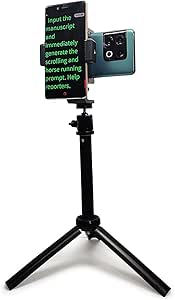 | Best for Two-Phone Creator Workflows | Weight: 280 g | Height adjustment: 3–17 inches | Rotation: 360 degrees | VIEW LATEST PRICE | See Our Full Breakdown |
More Details on Our Top Picks
Desview T5 Teleprompter for Smartphones, Tablets, and DSLR Cameras
The Desview T5 earns my Best Overall spot for creators who alternate between phone and DSLR filming. Its broad camera fit, nine adapter rings, and support for tablets under 11 inches make it more adaptable across rigs than the LENSGO TC7, whose tablet limit is smaller. The Bluetooth remote and free iOS/Android app add script editing and playback control, while adjustable positioning accommodates both horizontal and vertical mobile shooting. That range comes with a tradeoff: the app is needed for editing and playback features, so creators who prefer a screen-independent workflow may favor the Elgato Prompter, which has its own display but requires a computer. The T5’s tablet ceiling also rules out larger devices. It makes the most sense as a flexible, camera-ready kit rather than a dedicated desktop prompting system.
Pros:- Works with smartphones, tablets under 11 inches, and DSLR cameras.
- Nine included adapter ring sizes support a wide range of camera lenses.
- Bluetooth remote and free iOS/Android app provide script editing and playback control.
- Adjustable positioning supports horizontal and vertical mobile shooting.
Cons:- Tablets must be under 11 inches, limiting use with larger devices.
- Script editing and playback features depend on the app.
Best for: Video creators who switch between a smartphone, a DSLR, and a tablet under 11 inches across different recording setups.
Not ideal for: Creators who rely on a tablet 11 inches or larger, or who want a built-in display and desktop-based controls.
- Brand and model:Desview T5
- Compatible devices:Smartphones, tablets under 11 inches, and DSLR cameras
- Adapter ring sizes:49, 52, 55, 58, 62, 67, 72, 77, and 82 mm
- Glass:Coated, anti-scratch
- Remote:Bluetooth
- App compatibility:iOS and Android
- Warranty:12 months
Our verdict“Choose the T5 if you want one adaptable prompter for mobile devices and DSLR filming, and skip it if your workflow depends on a larger tablet or standalone screen.”
LENSGO TC7 9.7-Inch Teleprompter for Camera, Tablet, and Smartphone
The LENSGO TC7 suits creators who want a foldable camera prompter that can move between shoots without a bulky kit. Its 9.7-inch display area and support for cameras, smartphones, and tablets below 9.7 inches cover common compact setups, while eight lens adapter rings help it fit different camera lenses. Compared with the Desview T5, the TC7 specifies wide-angle support down to 17 mm and a 109.5-degree viewing angle, useful details for creators working with wider framing. Its narrower tablet limit makes it less versatile for larger-screen scripts, though, and the app may need updates. The app allows text and background color adjustments, but buyers should expect a software-dependent workflow. This is a practical choice for camera users who value a foldable form over broad tablet compatibility.
Pros:- Foldable design makes the kit easier to carry between filming locations.
- Supports cameras, smartphones, and tablets below 9.7 inches.
- Eight included camera lens adapter rings broaden lens compatibility.
- App controls scrolling and allows text and background color adjustments.
Cons:- Tablet support is limited to devices below 9.7 inches.
- The app may require updates to maintain a smooth workflow.
- The unit is not water resistant and does not provide image stabilization.
Best for: Creators using compact camera rigs and smartphones or tablets smaller than 9.7 inches who want a foldable prompting setup.
Not ideal for: Creators with larger tablets, or anyone who needs water resistance or image stabilization from the device.
- Display size:9.7 inches
- Supported devices:Camera, tablet, and smartphone
- Maximum tablet size:9.7 inches
- Wide-angle lens support:17 mm
- Viewing angle:109.5 degrees
- Glass angle:45 degrees
- Camera lens adapter rings:8 included
- App compatibility:iOS and Android
Our verdict“Pick the TC7 for a foldable, camera-oriented kit with wide-angle support, but choose the Desview T5 if you need room for a larger tablet.”
Elgato Prompter Teleprompter with Built-In Screen
The Elgato Prompter takes a different approach from phone-and-tablet rigs: its built-in 9-inch FHD screen displays scripts, chat, or video-call windows, so there is no separate mobile screen to position. That makes it a stronger fit for desk-based creators and streamers than the LENSGO TC7, which relies on a compatible phone or tablet. Camera Hub software offers control over text and chat appearance, and Stream Deck compatibility suits creators already using Elgato gear. The tradeoff is a computer-dependent setup: it connects by USB to a PC or Mac, with DisplayLink software required on Mac and DisplayLink Presenter on Android. At 0.69 kg and around 11 inches across, it is portable between desks, but less straightforward for filming away from a computer.
Pros:- Built-in FHD screen removes the need for a separate phone or tablet display.
- Can show scripts, chat, video calls, and other windows.
- Supports a wide range of cameras, including wide lenses.
- Works with Camera Hub and Stream Deck.
Cons:- Requires a PC or Mac for desktop control.
- Mac and Android workflows require additional DisplayLink software.
- Its computer-centered setup is less suited to remote filming without a desktop or laptop.
Best for: Desktop video creators and streamers who want to read scripts, chat, or call windows while looking toward the camera.
Not ideal for: Mobile-first creators who record without a PC or Mac, or buyers who want a simple phone-powered prompting kit.
- Display:9-inch FHD built-in screen
- Connectivity:USB
- Compatibility:PC and Mac
- Software:Camera Hub
- Weight:0.69 kg
- Dimensions:11.1 x 8.82 x 8.62 inches
- Color:Black
- Warranty and spare part availability:7 years
Our verdict“Choose the Elgato for a computer-based streaming or recording desk, not for a phone-first kit like the LENSGO TC7.”
GVM 12-Inch Collapsible Teleprompter Kit for Tablets, Phones, and Cameras
The GVM 12-Inch kit is aimed at creators who need to read comfortably from farther back: its 12-inch anti-reflective glass is rated for a reading distance of up to 15 feet. That gives it an advantage over the smaller LENSGO TC7 for roomier filming setups, while its collapsible design and carry bag help make transport possible. The app and Bluetooth remote let creators adjust playback, scrolling speed, and font size without reaching for the recording device. Its 5.68-pound weight is the main portability compromise; collapsible does not mean lightweight. Device fit is another limit, with phones and tablets supported only up to 8.6 inches. This is a better match for creators who prioritize readable text across a set over the lighter, smaller footprint of a compact prompter.
Pros:- 12-inch anti-reflective glass is rated for reading from up to 15 feet.
- Collapsible design and included carry bag support transport.
- Bluetooth remote and app control playback, scrolling speed, and font size.
- Aluminum-alloy construction and 1/4-inch and 3/8-inch mounting threads support camera setups.
Cons:- At 5.68 pounds, it is heavier to carry than compact options such as the LENSGO TC7.
- Compatible phones and tablets are limited to 8.6 inches.
- Its larger kit takes more space to transport and set up than a small foldable prompter.
Best for: Creators filming in studios or larger rooms who need a longer reading range and use phones or tablets up to 8.6 inches.
Not ideal for: Traveling creators who prioritize a lightweight bag, or anyone using a phone or tablet wider than 8.6 inches.
- Screen size:12 inches
- Reading range:Up to 15 ft (4.6 m)
- Maximum compatible device size:8.6 inches (22 cm)
- Camera mount threads:1/4 inch and 3/8 inch
- Materials:Aluminum alloy
- Controls:Bluetooth remote and GVM Teleprompter app for iOS and Android
- Weight:5.68 pounds
- Model:GVM-TQ-MA
Our verdict“Pick the GVM when longer reading distance matters more than low carry weight, and choose the TC7 for a smaller travel kit.”
LENSGO TC12P 14.5-Inch Smartphone Teleprompter with Bluetooth Remote
The LENSGO TC12P is a phone-first choice for creators who need to switch between horizontal and vertical shooting without changing prompting systems. Its 14.5-inch coated beam-splitter glass, adjustable holder, and Bluetooth remote make it more oriented toward flexible mobile framing than the camera-and-tablet-focused GVM 12-Inch kit. Light-seal foam helps reduce glare, while the TCQI app handles mirror mode and script scrolling. That app reliance is also the key compromise: the remote and script features depend on TCQI, so it is not a self-contained display like the Elgato Prompter. Device width is capped at 7.3 inches, which excludes wider phones or tablets. I would place it on a mobile creator’s shortlist when portrait video is part of the routine, not as a universal camera rig.
Pros:- Switches between horizontal and vertical shooting.
- 14.5-inch coated beam-splitter glass supports a phone-centered prompting setup.
- Bluetooth remote controls playback and scrolling through the TCQI app.
- Light-seal foam helps reduce glare.
Cons:- Compatible devices are limited to 7.3 inches wide.
- Remote and script features require the TCQI app.
- Supports smartphones and tablets rather than listing DSLR camera compatibility.
Best for: Mobile video creators who alternate between portrait and landscape recording and use phones or tablets up to 7.3 inches wide.
Not ideal for: Creators with wider devices, camera-first workflows, or a preference for prompting without a dedicated app.
- Brand and model:LENSGO TC12P
- Glass size:14.5 inches (37 cm)
- Maximum compatible device width:7.3 inches
- Compatible devices:Smartphones and tablets
- Remote control:Bluetooth
- App:TCQI for iOS and Android
- Warranty:1 year
- Included accessories:Bluetooth remote, adjustable phone/tablet holder, four phone lens rings, backplate, bracket, mount, and two 1/4-inch screws
Our verdict“Choose the TC12P if you regularly film both portrait and landscape video on a compatible phone, but look to the Desview T5 for a broader camera setup.”
NEEWER X12 14-inch Aluminum Alloy Teleprompter for iPad, Tablet, Phone & Camera
The NEEWER X12 suits creators who want a foldable, metal teleprompter with room for a tablet-based script. Its beam-splitter glass is specified for 75% light transmittance and readable text up to 10 feet, while the app and Bluetooth remote let you manage scrolling without reaching toward the camera. Compared with the smaller NEEWER Basics X12B, this model supports a broader mix of phones and tablets for prompting, though it still excludes 12-inch iPad Pro models. The aluminum body folds for transport, but portability does not remove the need to check your camera lens: lenses wider than its stated compatibility, or requiring under 28 mm focal length, are a mismatch. Choose it for a tablet-and-camera workflow; skip it if your rig depends on a wide-angle lens.
Pros:- Beam-splitter glass supports clear script reading from up to 10 feet.
- Bluetooth remote and companion app control scrolling, speed, and page turns.
- Foldable aluminum construction balances durability with easier storage.
- Supports compatible tablets, smartphones, and camera lenses.
Cons:- Not compatible with wide-angle lenses or lenses requiring under 28 mm focal length.
- Does not support 12-inch iPad Pro models.
Best for: Video creators who use a compatible tablet or phone as the script display and want a foldable aluminum teleprompter for camera-based recording.
Not ideal for: Creators using wide-angle lenses, lenses with a focal length under 28 mm, or a 12-inch iPad Pro.
- Brand and model:NEEWER X12
- Material:Aluminum alloy
- Screen size:9.84 inches
- Glass light transmittance:75%
- Text reading distance:Up to 10 ft
- Compatible devices:Compatible iPads, tablets, smartphones, and cameras with supported lenses
- Controls:Bluetooth remote and companion app
- Warranty:1 year
Our verdict“Choose the X12 if you want a foldable aluminum prompter for a compatible tablet-and-camera setup, but check lens clearance before buying.”
NEEWER Basics X12B 12-Inch Aluminum Alloy Teleprompter for Tablets and DSLR Cameras
The NEEWER Basics X12B is a straightforward pick for creators who record with a tablet script and a DSLR or similar camera. Its 12-inch glass, adjustable hood, and liftable platform help keep the camera lens centered while reflected text remains readable from up to 10 feet. Unlike the smartphone-friendly NEEWER X12, the X12B does not support phone shooting, so its appeal is narrower—but that distinction can make the choice easy if your workflow is tablet-first. The foldable design and included carry case help when the rig has to leave the studio, and the no-assembly setup reduces prep. It does not provide a self-view monitor, and the remote needs a separately supplied AAA battery. I’d pick it for a simple tablet-and-camera rig, not a phone-based filming kit.
Pros:- 12-inch beam-splitter glass supports reading from up to 10 feet.
- Liftable platform and adjustable hood help align the camera and manage light.
- Foldable design includes a protective carry case.
- Remote and app offer control over scrolling and text adjustments.
Cons:- Does not support phone shooting.
- Does not function as a monitor or provide direct self-view.
- Bluetooth remote requires an AAA battery that is not included.
Best for: Tablet-script creators who use a DSLR or compatible camera and want a foldable prompter with a carry case and minimal setup.
Not ideal for: Phone-first creators or presenters who need a built-in monitor for self-view while recording.
- Brand and model:NEEWER Basics X12B
- Screen size:12 inches
- Material:Aluminum alloy
- Glass light transmittance:75%
- Text reading distance:Up to 10 ft (3 m)
- Controls:RT113 Bluetooth remote and NEEWER Teleprompter app
- App compatibility:iOS 11.0 and later; Android 6.0 and later
- Included accessory:Carry case
- Warranty:1 year
Our verdict“Choose the X12B for a tidy tablet-and-DSLR setup with easy storage, but choose the X12 if phone shooting matters.”
Glazon 7.7-Inch Mini Teleprompter for Phone with Bluetooth Remote
The Glazon 7.7-inch Mini Teleprompter is aimed at creators who want a small prompting setup for phone filming, video calls, or compatible monitor mounting. Its phone holder adjusts to 3.8 inches wide, and the cold shoe mount gives you a place to add a compatible light or microphone without moving to a larger camera rig. The Stream Prompt app and Bluetooth remote control scrolling, speed, and font size, which helps keep a phone-based take moving. Compared with the LENSGO TCQI 10P, the Glazon is the more compact option, while the LENSGO includes a mini tripod and shading rings for its smartphone workflow. The Glazon’s stated specs do not list those accessories, and its remote requires batteries that are not included. It makes sense for a compact phone setup, not a tablet-and-camera production.
Pros:- Compact 7.7-inch format suits phone filming and compatible monitor setups.
- Adjustable holder accommodates smartphones up to 3.8 inches wide.
- Remote and Stream Prompt app control scrolling, speed, and font size.
- Cold shoe mount accepts compatible lights or microphones.
Cons:- Bluetooth remote batteries are not included.
- The small screen is less suited to long scripts or viewing from farther away.
- The listed setup is phone-focused rather than a tablet-and-camera rig.
Best for: Phone-based creators and remote presenters who want a compact teleprompter that can also mount to a compatible computer monitor.
Not ideal for: Creators who need a tablet-sized script display, a camera-focused teleprompter, or a supplied remote battery.
- Screen size:7.7 inches
- Phone holder width:Adjusts up to 3.8 inches
- Weight:1.3 lb
- Package dimensions:8.23 x 6.81 x 5.63 inches
- Compatibility:iOS and Android
- App:Stream Prompt
- Remote:Bluetooth; batteries not included
- Mount:Cold shoe
Our verdict“Pick the Glazon for compact phone prompting and accessory mounting, but look to the larger LENSGO TCQI 10P if a more equipped smartphone kit suits you better.”
LENSGO Teleprompter for Smartphone with Tripod, Magnetic Base & Remote
For creators filming on a smartphone away from a fixed studio, the LENSGO TCQI 10P stands out for packing several practical pieces into a 0.8-pound setup. Its magnetic base and included mini tripod make it quick to position, while four shading rings give you options for managing light when shooting indoors or outside. The 10-inch beam-splitting glass is larger than the Glazon’s 7.7-inch screen, a useful difference when you want a more generous script area without stepping up to a camera-and-tablet rig such as the NEEWER X12. The tradeoff is a phone-only workflow: supported phones must be no wider than 3.82 inches, and Android users need the included magnetic ring for attachment. I’d choose it for mobile shoots, not for creators planning to prompt from a tablet or camera-mounted system.
Pros:- At 0.8 pounds, it is easy to carry between filming locations.
- Magnetic base and included mini tripod support quick setup.
- Four shading rings help adapt the setup to different lighting conditions.
- Bluetooth remote and TCQI app provide script control.
Cons:- Limited to smartphones up to 3.82 inches wide.
- Android phones require the included magnetic ring for attachment.
- Its smartphone-focused design is less suitable than the NEEWER X12 for tablet-and-camera rigs.
Best for: Mobile video creators who want a lightweight smartphone teleprompter with a mini tripod, magnetic mounting, and shading options.
Not ideal for: Tablet or DSLR users, and smartphone owners whose devices exceed 3.82 inches in width.
- Screen size:10 inches
- Weight:0.8 lb
- Phone compatibility:iPhone and Android; Android requires included magnetic ring
- Maximum phone width:3.82 inches
- Glass:Beam-splitting glass with 70/30 light transmittance
- Included accessories:Mini tripod, magnetic base, magnetic ring, four shading rings, Bluetooth remote, and 1/4-20 screw
- App:TCQI app for iOS and Android
Our verdict“Choose the TCQI 10P for a lightweight smartphone kit with useful mounting accessories, provided your phone fits and you are comfortable with magnetic attachment.”
GVM TQ-L 18-Inch Teleprompter Kit for Tablets and Cameras
The GVM TQ-L is the large-format choice here: its 18-inch screen and support for tablets up to 12.9 inches give creators more room for a readable script than the NEEWER X12 or compact phone-focused options. That extra scale fits camera-based shoots where the prompter can stay set up, and the iOS/Android app and Bluetooth remote let you tune text size, playback speed, and background color. Its broad camera compatibility covers DSLRs, camcorders, and other small-to-mid-sized cameras. The tradeoff is substantial: at 16.12 pounds, it is much less convenient to carry than the foldable NEEWER models or the lightweight LENSGO TCQI 10P. I’d favor the GVM when script readability and tablet capacity matter more than travel ease; frequent mobile creators should choose a smaller kit.
Pros:- 18-inch screen offers a larger script area than the NEEWER X12 and phone-focused options.
- Supports tablets up to 12.9 inches.
- App and Bluetooth remote adjust playback and text settings.
- Designed to work with DSLRs, camcorders, and other small-to-mid-sized cameras.
Cons:- At 16.12 pounds, it is substantially less portable than the other picks in this batch.
- Camera support is specified for small-to-mid-sized models, not larger camera setups.
- Its larger format is less convenient for quick, compact mobile filming.
Best for: Studio or location creators using a larger tablet and a compatible DSLR, camcorder, or small-to-mid-sized camera.
Not ideal for: Solo creators who frequently travel light, or anyone using a camera larger than the stated small-to-mid-sized range.
- Model:GVM-TQ-L
- Screen size:18 inches
- Maximum tablet size:12.9 inches
- Construction:Aluminum
- Weight:16.12 lb
- Controls:iOS/Android app and Bluetooth remote
- Camera compatibility:DSLRs, camcorders, and other small-to-mid-sized cameras
- Included components:Mirror, hood, base, tablet bracket, camera bracket, Bluetooth remote, and control manual
Our verdict“Choose the GVM TQ-L when a large script display and 12.9-inch tablet support outweigh the burden of carrying a 16.12-pound kit.”
NEEWER X11 2-in-1 Teleprompter with 11-Inch Beam Splitter Glass and Built-In Monitor
The NEEWER X11 is the most self-contained camera-focused option here: its built-in 9-inch monitor can show prompts without a separate phone or tablet, and it can also serve as a second display for a Windows or macOS computer. That makes it a better fit for desk-based recording and streaming than the phone-led LENSGO TC7S, which depends on a mobile device and app. Its 11-inch beam-splitter glass, 75% light transmission, and support for lenses up to 72 mm give creators useful flexibility across compatible camera setups. The tradeoff is a more involved connection path: some computer connections need a driver, and phone mirroring requires DP protocol support. There is no voice sync, so scripts still need manual control rather than hands-free advancement.
Pros:- Built-in 9-inch monitor can display prompts without a separate phone or tablet.
- Can connect to Windows and macOS computers as a second display.
- Coated beam-splitter glass is designed to reduce ghosting.
- Adjustable holder and 2 kg quick-release plate capacity support flexible camera positioning.
Cons:- Does not support voice sync, so script advancement is not hands-free.
- Phone mirroring requires a compatible device with DP protocol support.
- Some computer connection methods require a driver.
Best for: Video creators who record or stream at a Windows or Mac desk and want prompting from a built-in display or compatible phone mirror.
Not ideal for: Creators who need voice-controlled script advancement or want a simple phone-only setup without checking device and connection compatibility.
- Beam-splitter glass:11 inches; 75% light transmission
- Built-in monitor:9-inch HD LCD
- Monitor resolution:1024 × 768
- Readable text distance:Up to 2.5 m
- Supported lens threads:Up to 72 mm
- Supported focal lengths:35–200 mm
- Holder adjustment:10 cm horizontal; 3 cm vertical
- Computer compatibility:Windows and macOS
- Warranty:1 year
Our verdict“Choose the X11 for a camera-based desk setup where its built-in monitor and computer-display support matter more than voice control or plug-and-play simplicity.”
LENSGO TC7S Foldable Teleprompter for Phones
The LENSGO TC7S suits creators who want a phone-centered prompting kit that packs down quickly. Its folding design is a practical advantage over the more camera-oriented NEEWER X11: you can carry the TC7S between rooms or locations without bringing a separate monitor. The Bluetooth remote and TCQI app let you control playback and adjust scroll speed, text, and background from iOS or Android, while portrait and landscape phone placement supports different shooting formats. Its limits are tied to that compact approach. Tablets must be under 8 inches, and image-based scripts are not recommended, making it less flexible for creators with larger devices or visual-heavy material. Compared with the camera-and-tablet-capable Desview T3, this is the more narrowly phone-oriented choice.
Pros:- Folds quickly for easier transport between recording locations.
- Bluetooth remote controls playback and scrolling speed.
- TCQI app supports iOS and Android with text and display adjustments.
- Phone can be positioned in portrait or landscape orientation.
Cons:- Tablet compatibility is limited to devices under 8 inches.
- Image-based scripts are not recommended.
- Its phone-focused design is less versatile than the Desview T3 for camera-and-tablet combinations.
Best for: Mobile video creators who record with a smartphone, want a foldable prompting rig, and use text scripts they can control by Bluetooth remote.
Not ideal for: Creators who rely on tablets larger than 8 inches, image-based scripts, or a teleprompter designed around a dedicated camera setup.
- Display size:9.7 inches
- Compatible devices:Smartphones and tablets under 8 inches
- Operating system compatibility:iOS and Android
- App:TCQI
- Remote control:Bluetooth
- Supported file format:.txt
- Warranty:1 year
- Included items:Teleprompter, phone shade, phone clip, screws, remote, instructions, and box
Our verdict“Pick the TC7S if a foldable phone-based rig and remote-controlled text scripts matter more than broad tablet compatibility.”
Desview T3 Portable Teleprompter for Camera & Smartphone, Tablet Prompter up to 10″
The Desview T3 earns its place through device flexibility: it supports DSLR and mirrorless cameras alongside smartphones and tablets up to 10 inches. Its 70/30 beam-splitter ratio and stated 10-foot reading distance make it a practical match for creators who move between camera formats or record from farther back. Compared with the phone-first LENSGO TC7S, the T3 gives tablet users more room, while its detachable design helps keep transport manageable. The free iOS and Android app and Bluetooth remote offer straightforward script control. The cost of that broader camera fit is a larger on-camera assembly, which may crowd very small rigs. The remote also needs two AAA batteries, not included, so it is not quite as ready to use out of the box as a kit with supplied power.
Pros:- Works with DSLR and mirrorless cameras, smartphones, and tablets up to 10 inches.
- 70/30 beam-splitter glass is designed for clear script viewing with minimal distortion.
- Detachable design supports easier packing and transport.
- Bluetooth remote and free iOS and Android app provide hands-free script control.
Cons:- May feel bulky on very small camera setups.
- Bluetooth remote requires two AAA batteries, which are not included.
- The broad camera fit can be more setup than phone-only creators need.
Best for: Creators alternating between a DSLR or mirrorless camera and a phone or tablet, especially those who need support for tablets up to 10 inches.
Not ideal for: Creators with very small camera rigs or anyone seeking the lightest phone-only prompting setup.
- Beam-splitter ratio:70/30
- Compatible devices:DSLR, mirrorless cameras, smartphones, and tablets up to 10 inches
- Lens adapter sizes:49, 52, 55, 58, 62, 67, 72, 77, and 82 mm
- Reading distance:10 ft
- Remote control:Bluetooth; requires two AAA batteries
- App compatibility:Android and iOS
- Warranty:12 months
Our verdict“Choose the T3 when one portable teleprompter needs to cover both camera and tablet-based recording.”
GVM Parrot Pro 18.5-Inch Teleprompter Kit with App and Bluetooth Remote
The GVM Parrot Pro prioritizes a large prompt display over a small travel footprint. Its 18.5-inch Android screen gives creators a more generous text area than the Desview T3, which is better suited to compact camera-and-device combinations. That extra display space can help when reading from a camera at a greater distance or keeping text comfortably visible during longer recordings. An aluminum alloy base and bracket add structure, while the app and Bluetooth remote let you change text size, speed, and background color. This is still a camera-and-camcorder kit, not a two-phone setup like the PaiPaiGo Dual Phone Teleprompter. Its folded length is 18.5 inches, and it is not water resistant, so creators prioritizing a compact bag or outdoor weather tolerance should look elsewhere.
Pros:- 18.5-inch Android display provides a larger prompt area than compact options such as the Desview T3.
- App supports adjustments to text size, playback speed, and background color.
- Included Bluetooth remote controls scrolling and playback.
- Aluminum alloy base and bracket provide a sturdy camera-oriented structure.
Cons:- Folded length of 18.5 inches makes it less compact than smaller portable models.
- Not water resistant.
- Designed for camera and camcorder setups rather than a simple dual-phone arrangement.
Best for: Creators filming with an SLR, digital camera, or camcorder who want a large display for readable prompts during longer or farther-back recordings.
Not ideal for: Phone-only creators, frequent travelers who need a very compact kit, or anyone recording where water exposure is a concern.
- Display size:18.5 inches
- Compatible devices:SLR cameras, camcorders, digital cameras, and DV machines
- App compatibility:iOS and Android
- Frame material:Aluminum alloy
- Folded dimensions:18.5 × 4 × 4 inches
- Water resistance:Not water resistant
- Included items:Mirror, hood, base, display, camera bracket, Bluetooth remote, and manual
Our verdict“Choose the Parrot Pro if readable, large-format prompting for a camera or camcorder is worth carrying a longer kit.”
PaiPaiGo Dual Phone Teleprompter Kit with Adjustable Tripod
The PaiPaiGo Dual Phone Teleprompter Kit takes a different route from glass-and-camera systems: it holds one phone for the script and another for recording. That makes it a natural fit for creators shooting directly on a phone who want to keep their camera app separate from prompt control. Its included tripod, adjustable height, 360-degree rotation, and tilt up to 90 degrees provide more framing flexibility than a fixed phone holder, while the 280 g weight favors lightweight mobile setups. Compared with the LENSGO TC7S, it avoids relying on a single phone for both prompt and recording, but it does not offer the same beam-splitter setup. The limits are clear: it will not take tablets or foldable phones, and its tripod is not intended for heavier camera rigs.
Pros:- Separate phone clamps let one device show the script while another records.
- Supports portrait and landscape shooting orientations.
- Height, rotation, and tilt adjustments help tailor framing.
- Lightweight 280 g kit includes a tripod and storage bag.
Cons:- Not compatible with tablets or foldable phones.
- Tripod is not intended for heavy camera setups.
- Requires two phones for its distinct prompting-and-recording workflow.
Best for: Smartphone creators who have two standard phones available and want one to display the script while the other records.
Not ideal for: Creators who use a tablet or foldable phone as their prompt screen, or who need a tripod for a camera-heavy setup.
- Weight:280 g
- Height adjustment:3–17 inches
- Rotation:360 degrees
- Tilt:Up to 90 degrees
- Compatibility:Phones; not compatible with tablets or foldable phones
- Included components:Telescopic rod, tripod stand, dual phone clamp, and storage bag
Our verdict“Pick the PaiPaiGo if you record on one standard smartphone and want a second phone dedicated to displaying your script.”

How We Picked
I compared these portable teleprompters for video creators by how well their format suits real recording setups: supported phones, tablets, and cameras; beam-splitter size; portability; setup demands; and whether a built-in display or remote adds practical value. I also weighed the likely tradeoffs between readable script area, camera access, carrying bulk, and dependence on a separate device. A large glass panel can help with long scripts, but it is not automatically the better choice for a creator filming on the move.
The ranking favors versatility and a workable balance for the broadest range of creators, then gives distinct places to compact phone rigs, built-in-screen models, and larger studio-oriented kits. Products with a narrower device fit rank lower for general use, even when that specialization may suit a particular buyer. No ranking assumes that one size or workflow works for everyone; the role labels and comparisons are intended to show where each option makes the most sense.
Factors to Consider When Choosing Portable Teleprompters For Video Creators
Before choosing a teleprompter, I’d match it to the way you record rather than choosing by glass size alone. These broader checks can prevent a common mismatch: buying a rig that looks capable on paper but is awkward with your camera, script device, or filming space.
Match the Prompter to Your Recording Device
Start by listing the exact devices you plan to use: phone, tablet, camera, or webcam. A teleprompter may hold a tablet for script display while mounting a camera behind the glass, but that does not mean every phone or camera body will fit its tray and mounting arrangement. Check device dimensions, camera-lens clearance, and whether your phone must serve as both script screen and recording camera. A common mistake is buying for the device you own now without thinking about a likely camera upgrade. If you switch between devices, prioritize adjustable mounts and a workflow that does not depend on a single screen size. If you record only on a phone, a simpler phone-first design may be easier to carry and set up.
Choose Screen Size for Your Script and Camera Distance
Glass size affects how much script can appear at once and how far the rig can sit from you, but larger is not always more natural. A small display can work well for short clips and close framing, while longer scripts may benefit from a wider reading area that lets you use larger text. Think about how far the camera will be from your face and whether your eyes will visibly travel across the glass. Enlarging text can reduce how much script fits on screen, so test your preferred font size and scroll speed before committing to a very compact model. Bigger units can add bulk to travel kits and may be excessive for a desk or phone-only setup. Choose based on your typical framing and script length, not the largest number in a product name.
Plan for the Full Carry-and-Setup Routine
“Portable” can mean foldable, lightweight, or simply movable between rooms, so decide what portability means for your work. If you pack for outdoor shoots or travel, consider the folded footprint, protective storage, and how many separate parts must be carried. A larger rig may still be portable between studio locations but less appealing for a compact backpack kit. Setup time also matters when recording frequent short videos; extra mounting steps can interrupt a fast creator workflow. Look for a design that fits your tripod and leaves space for cables, lens controls, and any microphone you need. Before buying, compare the complete rig you will carry, not just the glass panel.
Decide Whether a Built-In Screen Is Worth the Tradeoff
A built-in display can simplify a setup by reducing the need to fit a separate phone or tablet behind the glass. It may also bring connection, power, and software questions that a passive glass-and-device setup avoids. Check how the display connects to your computer or camera workflow, what power source it needs, and whether the script app you prefer is supported. If you already own a tablet that works well for prompting, paying for an integrated screen may add little value. On the other hand, creators who want a dedicated screen may prefer the tidier arrangement. Decide whether fewer separate devices or more flexibility matters more in your studio.
Check Remote Controls and App Workflow Before Filming
A remote can help you start, pause, or scroll a script without reaching toward the camera, but its usefulness depends on the app and control functions it supports. Confirm whether it operates the prompting software you plan to use, and whether you need manual scrolling, timed scrolling, or basic playback controls. Bluetooth pairing adds another step and can introduce battery management to a setup that otherwise stays simple. For solo creators, hands-free script control can make retakes less disruptive; for a crew, an operator may handle scrolling instead. Do not assume a bundled remote removes the need to check app compatibility. A reliable routine matters more than a long feature list.
Budget for the Complete Camera Setup, Not Just the Prompter
A teleprompter is one part of a filming rig, so account for the tripod, camera mount, device, cables, power, and storage you may need around it. A model that works with a tabletop stand may not suit a heavier camera or a longer-lens setup without additional support. Check how the design affects access to focus rings, camera buttons, and ports before recording. Larger glass can call for a sturdier support system, while compact phone kits may limit camera upgrades. Paying more makes sense when the included screen, broader device compatibility, or larger reading area solves a recurring problem. If those benefits do not fit your routine, a simpler rig may leave more room for the equipment you actually use.
Frequently Asked Questions
Can I use a teleprompter with my phone as both the camera and script display?
Some phone-first designs support this approach, but the exact arrangement varies: the phone may sit in front of the glass, behind it, or in a dedicated mount. Check that the camera lens lines up with the opening and that the display remains readable through the beam-splitter glass. A second device can make setup easier if your phone’s camera and prompting app compete for the same screen. For short solo videos, a phone-focused model can be convenient; for more flexible filming, a camera-mounted kit may suit upgrades better. Confirm the mounting layout before choosing.
Will a larger teleprompter make my eye movements less noticeable?
Not by itself. Eye movement depends on the width of the text, font size, reading speed, camera distance, and how much script is visible at once. A larger beam splitter can give you room for larger lettering or a wider text column, but placing the camera too far away can still make your gaze look less direct. Try narrowing the text column and increasing the font size before assuming you need the largest panel. The right fit is the one that keeps the script readable while your eyes stay close to the lens.
Do I need a built-in screen if I already own a tablet?
Not necessarily. A tablet-supported teleprompter can be a flexible choice if your tablet fits the tray and works with the prompting app you prefer. A built-in display may make the rig more self-contained, which can be useful if you want a dedicated screen or a cleaner studio arrangement. It can also add connection and power requirements that a separate tablet setup may not have. Compare your current device workflow with the display’s compatibility before paying for an all-in-one format.
Is an 18-inch teleprompter too large for a one-person creator setup?
It depends on whether your setup stays mostly in one place and how you frame your videos. A larger panel can help with longer scripts or greater camera distance, but it also needs more space and a stable support system. For a creator who records at a desk or in a studio, the added footprint may be manageable. If you pack gear often, move between rooms, or film with a small phone setup, a smaller model may be easier to live with. Measure your available space and check the complete rig dimensions before deciding.
What should I check before buying a teleprompter for a camera upgrade?
Check the supported camera mounting method, lens clearance, camera body dimensions, and whether the teleprompter leaves access to controls and ports. Also confirm which device displays the script and whether its tray can accommodate the screen you plan to use. A rig that works with a phone today may not suit a larger camera without a different mount or more stable support. Think about your likely lens and tripod setup as well as the camera body. If you expect to change equipment, a more adaptable camera-and-tablet design may save you from replacing the whole rig.
Conclusion
For a single recommendation that balances script space and broad camera use, I’d choose the NEEWER X12 as the best overall. The NEEWER Basics X12B is the value-minded choice for creators who want a tablet-and-camera format without prioritizing a built-in display, while the Elgato Prompter is my premium pick for a dedicated-screen workflow. Beginners filming mainly on a phone should compare the Desview T5 with the simpler phone-focused LENSGO and Glazon options. For a compact kit, look at the LENSGO TC7S or Glazon Mini; for long scripts and a more stationary setup, consider the GVM TQ-L or GVM Parrot Pro. Choose by your devices, filming distance, and willingness to carry a larger rig—not by screen size alone.