
🔍 Read the full analysis: 8 Monitors To Consider For High Refresh Rate Gaming In 2027 on ThorstenMeyerAI.com

Get everyday essentials delivered free with Prime
- Fast, free delivery on millions of items
- Prime Video, Amazon Music and more included
- Member-only deals all year
TL;DR
ThorstenMeyerAI.com compares eight gaming monitors across 4K, QHD and 1080p resolutions, with refresh rates and screen formats aimed at different setups. The MSI MAG 272URDFA E16 is its overall pick for combining 4K and 320Hz, but the guide does not establish 2027 pricing, availability or independent test results.
ThorstenMeyerAI.com has compared eight gaming monitors for readers considering high-refresh displays in 2027, ranging from a 4K, 320Hz MSI to compact 1080p models and larger curved screens. The guide’s central point is that refresh rate alone does not determine fit: resolution, graphics-card capability, panel type and screen size all affect what a buyer can use.
The guide names the MSI MAG 272URDFA E16 its best overall choice, citing its combination of 4K resolution and 320Hz refresh. That pairing offers high resolution and a high refresh ceiling, but the source says reaching high frame rates at 4K requires a capable graphics card. It does not provide benchmark results showing how particular PCs perform with the monitor.
For a more conventional resolution-to-speed balance, the guide points to the AOC Q27G41ZE, a 27-inch QHD display rated at 240Hz natively, with a 260Hz overclocked mode. It describes the Samsung Odyssey OLED G6 as the panel-technology alternative, highlighting its QD-OLED design rather than positioning it simply as another high-refresh OLED option.
The other five picks span different uses: the ASUS VG259QM5A and Dell SE2426HG are 24-inch-class 1080p choices; the Sceptre 34-inch ultrawide and 32-inch SANSUI target buyers seeking larger ultrawide formats; and the AOC C27G4ZH pairs a 27-inch curved screen with 1080p. The supplied guide does not list full specifications for every model, so features beyond those stated should not be assumed.
The 8 picks
- 1
 Samsung 27" Odyssey OLED G6 (G61SH) QD-OLED Gaming MonitorView on Amazon →
- 2
 msi MAG 272URDFA E16 27-inch 3840 x 2160 (UHD) Gaming Office Monitor, 320Hz,…View on Amazon →
- 3
 Sceptre C345B-QU240T 34-inch Curved Ultrawide Gaming MonitorView on Amazon →
- 4
 SANSUI 32 Inch Curved 240Hz Gaming Monitor High Refresh Rate, FHD 1080PView on Amazon →
- 5
 AOC 27" Gaming Monitor QHD 240Hz Overclocked IPS NVIDIA G‑Sync Q27G41ZEView on Amazon →
- 6
 AOC C27G4ZH 27-Inch Curved FHD Gaming MonitorView on Amazon →
- 7
 ASUS TUF Gaming VG259QM5A 24.5-Inch 1080p 240Hz Gaming MonitorView on Amazon →
- 8
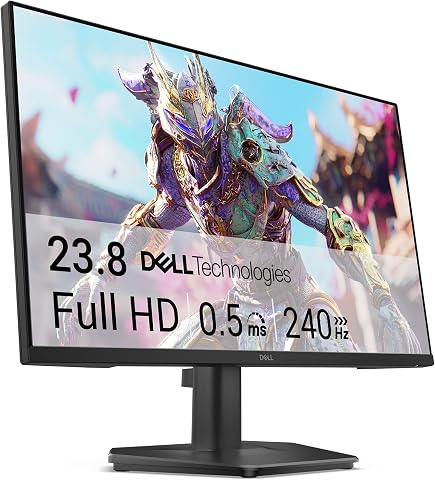 Dell 24 240Hz Gaming Monitor – SE2426HG – 23.8-inch FHD (1920×1080) 240Hz Dis…View on Amazon →
Matching Refresh to Your PC
The comparison matters because a monitor’s maximum refresh rate is not the same as the frame rate a computer can deliver. Resolution changes the graphics workload: 4K demands more rendering power than QHD or 1080p, so a high refresh ceiling may go unused if a PC cannot produce enough frames in the games being played.
That tradeoff affects both cost and everyday experience. Competitive players with a midrange system may prefer a 24-inch 1080p display that makes high frame rates easier to reach, while someone seeking more detail may favor QHD. A large or ultrawide screen can offer a more expansive view, but pixel density, desk depth and game compatibility matter. The guide’s use-case approach is more useful than treating the biggest refresh-rate figure as an automatic winner.
Products Worth Considering

Jackery HomePower 3600 Plus Portable Power Station, 3584Wh, 3600W

Sonos One (Gen 2) Two-Room Set Voice-Controlled Smart Speaker with Alexa (2-Pack, Black)

Apple MacBook Air 13-inch with M5 Chip, 16GB Memory, 512GB SSD, Sky Blue
As an affiliate, we earn on qualifying purchases.
Eight Displays, Different Tradeoffs
The source says its ranking weighs refresh rate, resolution and screen format together, along with panel type, adaptive-sync support where specified, connectivity and adjustment details. It also says it does not assume a feature is present when product details do not specify it. The supplied material, however, does not include a full specification table, testing methodology, prices or retailer links.
Its selection reflects several common gaming setups. QHD sits between 1080p and 4K in image detail and graphics demand, while smaller 1080p screens can make sense for close-up competitive play. Larger 1080p displays may look less crisp at a typical desk distance. Curved and ultrawide designs are matters of fit and preference, and the guide advises checking whether a player’s games support ultrawide layouts.
“The MSI combines 4K resolution and 320Hz refresh.”
— ThorstenMeyerAI.com buying guide
Prices and Testing Remain Unspecified
The supplied source does not state when the guide was published, whether all eight monitors will remain available in 2027, or what they will cost. It also gives no independent measurements of response time, brightness, color performance, input lag or real-world frame rates. The recommendations should therefore be read as the guide’s comparison, not as verified rankings based on test data included here.
Full specifications are also missing for several entries, including details that may affect a purchase, such as connectivity, stand adjustment and adaptive-sync support. Buyers should check the manufacturer’s current product information and confirm compatibility with their graphics card before deciding. The source’s stated refresh rates and panel descriptions are the factual basis available here; other model features remain unconfirmed.
Check Current Specs Before Buying
The next step for readers is to compare current manufacturer specifications and retailer listings for the models they are considering. Check the native refresh rate, resolution and any overclocked modes, as well as panel type, adaptive-sync support and the connections needed for a particular PC. Availability and prices should be verified at the time of purchase, especially because the guide is framed around 2027 without confirming a publication date.
Buyers should also check performance in the games they actually play, measure desk space and viewing distance, and confirm that ultrawide titles display as intended. Without product testing or updated market information in the supplied material, no single recommendation can be treated as a confirmed best buy for every setup.
Key Questions
Which monitor does the guide recommend overall?
ThorstenMeyerAI.com names the MSI MAG 272URDFA E16 its overall pick, citing its 4K resolution and 320Hz refresh. The guide cautions that high frame rates at 4K require a capable graphics card.
What is the QHD option in the comparison?
The AOC Q27G41ZE is the guide’s QHD speed pick. It is described as offering 240Hz natively and an overclocked 260Hz mode.
Which model is highlighted for its panel type?
The guide singles out the Samsung Odyssey OLED G6 for its QD-OLED panel. The supplied material does not include independent image-quality test results.
Are the listed monitors confirmed to be available in 2027?
No. The source is framed as a 2027 buying guide, but it does not provide current inventory, prices or confirmation that each model will be available then. Buyers should check current listings and manufacturer details.
Source: ThorstenMeyerAI.com