

USB-C flash drives for journalists need to move interviews, photos, documents, and video between field devices and newsroom computers without adding much bulk. My best overall pick is the Lexar JumpDrive D400, whose USB-C and USB-A connectors suit mixed-device workflows; the SanDisk Extreme PRO stands out for reporters who prioritize capacity, while the SanDisk Ultra Dual Drive Go offers a compact way to bridge both connector types. The main tradeoffs are flexibility versus a single compact connector, and generous capacity versus a smaller drive that is easier to carry and manage. Speed claims and device compatibility also matter, but neither replaces a separate backup of important reporting files. Read on for the full comparison and guidance by reporting style.

Get everyday essentials delivered free with Prime
- Fast, free delivery on millions of items
- Prime Video, Amazon Music and more included
- Member-only deals all year
Key Takeaways
- Dual connectors are the clearest practical advantage for journalists moving files between USB-C phones or tablets and older USB-A newsroom computers; several Lexar, SanDisk, and Kingston options offer that flexibility.
- The SanDisk Extreme PRO is the capacity-led pick at 512GB, while most other listed models top out at 256GB or less; that extra space suits larger media collections but may be unnecessary for text-first reporting.
- Small form factors favor convenience, not necessarily workflow flexibility. The SanDisk Extreme Fit is a compact USB-C choice, while dual-connector drives are better suited to mixed ports.
- Several entries share a similar role. The 64GB and 128GB SanDisk Ultra Dual Drive Go versions differ mainly in capacity, so buyers should match storage to assignment size rather than assume the larger one changes the workflow.
- Capacity and connector options are easier to compare than sustained performance. Only some listed product names provide a specific read-speed figure, so do not treat stated peak speed as a guarantee for long transfers or every device.
| Lexar JumpDrive D400 128GB Dual USB-C and USB-A Flash Drive |  | Best for Mixed-Device Workflows | Storage capacity: 128 GB | Interface: USB 3.2 Gen 1 | Connectors: USB Type-C and USB Type-A | VIEW LATEST PRICE | See Our Full Breakdown |
| SanDisk Ultra Slider 256GB USB-C Flash Drive |  | Best for High-Capacity USB-C Transfers | Storage capacity: 256 GB | Connector: USB Type-C | Interface: USB 3.2 Gen 1 | VIEW LATEST PRICE | See Our Full Breakdown |
| SanDisk Ultra Luxe 128GB USB-C Flash Drive |  | Best Metal-Bodied Pick | Storage capacity: 128 GB | Connector: USB Type-C | Interface: USB 3.2 Gen 1 | VIEW LATEST PRICE | See Our Full Breakdown |
| Lexar C40E 64GB USB-C Flash Drive, USB 3.2 Gen 1 |  | Best for Phone Photo Backup | Storage capacity: 64 GB | Interface: USB 3.2 Gen 1 | Connector: USB Type-C | VIEW LATEST PRICE | See Our Full Breakdown |
| SanDisk 256GB USB-C Flash Drive, Up to 250MB/s Read Speed |  | Best Lightweight Capacity Pick | Storage capacity: 256 GB | Interface: USB 3.2 Gen 1 | Connector: USB Type-C | VIEW LATEST PRICE | See Our Full Breakdown |
| SanDisk Extreme Fit 256GB USB-C Flash Drive |  | Best for Compact, Plug-and-Stay Use | Storage capacity: 256 GB | Interface: USB 3.2 Gen 1 | Connector: USB Type-C | VIEW LATEST PRICE | See Our Full Breakdown |
| Samsung Type-C USB Flash Drive 128GB, USB 3.2 Gen 1 |  | Best for Field Durability | Capacity: 128 GB | Interface: USB 3.2 Gen 1 (Type-C) | Read speed: Up to 400 MB/s | VIEW LATEST PRICE | See Our Full Breakdown |
| SanDisk Ultra Dual Drive Go 128GB USB-C & USB-A Flash Drive | 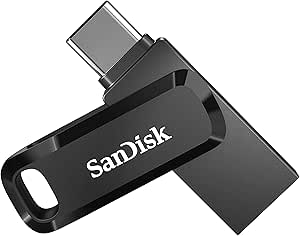 | Best for Mixed USB-C and USB-A Workflows | Capacity: 128 GB | Interface: USB 3.1 Gen 1 | Connectors: USB Type-C and USB Type-A | VIEW LATEST PRICE | See Our Full Breakdown |
| SanDisk Ultra Dual Drive Go 64GB USB-C and USB-A Flash Drive | | Best for Small, Occasional Transfers | Storage capacity: 64 GB | Connectors: USB Type-C and USB Type-A | Interface: USB 3.1 Gen 1 / USB 3.0 | VIEW LATEST PRICE | See Our Full Breakdown |
| Kingston DataTraveler microDuo 3C 256GB USB-C and USB-A Flash Drive |  | Best High-Capacity Dual-Connector Pick | Storage capacity: 256 GB | Connectors: USB Type-C and USB Type-A | Interface: USB 3.2 Gen 1 | VIEW LATEST PRICE | See Our Full Breakdown |
| Lexar D50E 128GB Dual USB Flash Drive |  | Best for Fast Transfers Between USB-C and USB-A | Capacity: 128 GB | Interface: USB 3.2 Gen 1 | Connectors: USB Type-A and USB Type-C | VIEW LATEST PRICE | See Our Full Breakdown |
| SanDisk Extreme PRO 512GB USB-C Flash Drive |  | Best for Large, Speed-Sensitive Assignments | Capacity: 512 GB | Interface: USB 3.2 Gen 2 | Connector: USB Type-C | VIEW LATEST PRICE | See Our Full Breakdown |
| Lexar D40E 128GB Dual USB 3.2 Gen 1 Flash Drive, Champagne Silver |  | Best for Swivel-Cover Simplicity | Capacity: 128 GB | Interface: USB 3.2 Gen 1 | Connectors: USB Type-A and USB Type-C | VIEW LATEST PRICE | See Our Full Breakdown |
| SanDisk Ultra 256GB USB-C Flash Drive |  | Best for Password-Protected Everyday Files | Capacity: 256 GB | Connector: USB Type-C | Interface: USB 3.1 Gen 1 / USB 3.0 | VIEW LATEST PRICE | See Our Full Breakdown |
| SanDisk Ultra Dual Drive Luxe 256GB USB-C + USB-A Flash Drive |  | Best for Cross-Device Field Handoffs | Capacity: 256 GB | Interface: USB Type-C and USB Type-A | Standard: USB 3.2 Gen 1 | VIEW LATEST PRICE | See Our Full Breakdown |
| USB-C flash drives for journalist | Interface | Maximum read speed | Dimensions | Storage capacity |
|---|---|---|---|---|
| Lexar JumpDrive D400 128GB Dua | USB 3.2 Gen 1 | Up to 130 MB/s | — | 128 GB |
| SanDisk Ultra Slider 256GB USB | USB 3.2 Gen 1 | Up to 400 MB/s | — | 256 GB |
| SanDisk Ultra Luxe 128GB USB-C | USB 3.2 Gen 1 | — | — | 128 GB |
| Lexar C40E 64GB USB-C Flash Dr | USB 3.2 Gen 1 | Up to 400 MB/s | 2.17 × 0.29 × 0.63 in | 64 GB |
| SanDisk 256GB USB-C Flash Driv | USB 3.2 Gen 1 | Up to 250 MB/s | 1.94 × 0.81 × 0.46 in | 256 GB |
| SanDisk Extreme Fit 256GB USB- | USB 3.2 Gen 1 | Up to 400 MB/s | 0.73 × 0.54 × 0.63 in (D × W × H) | 256 GB |
| Samsung Type-C USB Flash Drive | USB 3.2 Gen 1 (Type-C) | — | 0.32 × 1.33 × 0.63 in (D × W × H) | — |
| SanDisk Ultra Dual Drive Go 12 | USB 3.1 Gen 1 | — | 0.34 × 0.48 × 1.75 in (D × W × H) | — |
| SanDisk Ultra Dual Drive Go 64 | USB 3.1 Gen 1 / USB 3.0 | — | 1.7 × 0.5 × 0.3 in | 64 GB |
| Kingston DataTraveler microDuo | USB 3.2 Gen 1 | — | 0.33 × 0.65 × 0.33 in | 256 GB |
| Lexar D50E 128GB Dual USB Flas | USB 3.2 Gen 1 | Up to 400 MB/s | 2.49 × 0.4 × 0.63 in | — |
| SanDisk Extreme PRO 512GB USB- | USB 3.2 Gen 2 | Up to 1000 MB/s | 2.64 × 0.83 × 0.47 in | — |
| Lexar D40E 128GB Dual USB 3.2 | USB 3.2 Gen 1 | 100 MB/s | — | — |
| SanDisk Ultra 256GB USB-C Flas | USB 3.1 Gen 1 / USB 3.0 | Up to 150 MB/s | — | — |
| SanDisk Ultra Dual Drive Luxe | USB Type-C and USB Type-A | Up to 400 MB/s | — | — |
More Details on Our Top Picks
Lexar JumpDrive D400 128GB Dual USB-C and USB-A Flash Drive
For journalists who regularly move files between a USB-C phone and a USB-A newsroom computer, the JumpDrive D400’s two built-in connectors remove the need to hunt for an adapter. Its swivel metal housing covers the connectors when not in use, while mobile photo backup and password-protected file encryption add useful tools for field handoffs. Read speeds reach 130 MB/s, so this is better suited to moving interview notes, documents, and selected photos than to frequent transfers of very large media folders. Compared with the SanDisk Ultra Slider 256GB, it has half the capacity and a lower stated read speed, but works with USB-A ports as well as USB-C. The tradeoff is that write speeds are lower than read speeds, and compatibility still depends on the device and its software.
Pros:- USB-C and USB-A connectors support transfers between compatible devices without a separate adapter.
- Swivel metal housing helps cover and protect the connectors.
- Supports mobile photo backups and password-protected file encryption.
- Five-year limited warranty.
Cons:- Read speeds are up to 130 MB/s, below the stated 400 MB/s of the SanDisk Ultra Slider 256GB.
- Write speeds are lower than read speeds, which can slow backups to the drive.
- Device compatibility depends on the phone, computer, and their software.
Best for: Reporters who move files between USB-C phones or laptops and older computers with USB-A ports, and want a drive with basic file-encryption support.
Not ideal for: Video journalists who routinely transfer large footage folders or need high capacity and faster stated reads; the 128GB capacity and up-to-130 MB/s read speed are less suited to that workload.
- Storage capacity:128 GB
- Interface:USB 3.2 Gen 1
- Connectors:USB Type-C and USB Type-A
- Maximum read speed:Up to 130 MB/s
- Housing:Swivel metal
- Compatible devices:iPhone 15, Android devices, Windows PCs, and Mac computers
- Warranty:5-year limited
Our verdict“Choose the JumpDrive D400 if your reporting workflow spans USB-C and USB-A devices; pick a faster, higher-capacity drive if you mainly move large media files.”
SanDisk Ultra Slider 256GB USB-C Flash Drive
The 256GB capacity gives reporters room for working copies of documents, audio, and selected video without stepping up to a larger drive, while the stated read speed of up to 400 MB/s is the highest listed in this group. That makes the Ultra Slider a stronger fit for moving files to a USB-C laptop than the 130 MB/s Lexar JumpDrive D400, though the Lexar is more flexible when a USB-A newsroom computer is involved. The slider retracts the connector for carrying, and a keyring hole helps keep it with a field kit. Its all-USB-C design is the main limitation: older devices may need an adapter, and the plastic body does not offer the metal enclosure found on the SanDisk Ultra Luxe 128GB. The stated speed is a maximum, not a guarantee across every host device or transfer.
Pros:- 256GB capacity accommodates larger working collections than the 128GB options in this batch.
- Maximum read speed is stated at up to 400 MB/s.
- Retractable connector avoids leaving the plug exposed while carried.
- Keyring hole makes it easier to attach to a field kit.
Cons:- USB-C-only connection may require an adapter for USB-A computers.
- Plastic construction lacks the metal enclosure of the SanDisk Ultra Luxe 128GB.
- Actual usable storage is less than the stated 256GB.
Best for: USB-C-first reporters who carry sizable collections of working files and want more capacity and faster stated reads than the Lexar JumpDrive D400.
Not ideal for: Journalists who regularly plug into USB-A computers or prefer a metal-bodied drive; this model has only USB-C and a plastic housing.
- Storage capacity:256 GB
- Connector:USB Type-C
- Interface:USB 3.2 Gen 1
- Maximum read speed:Up to 400 MB/s
- Maximum write speed:Up to 400 MB/s
- Connector design:Retractable
- Material:Plastic
- Additional feature:Keyring hole
Our verdict“Choose this Slider for capacity and fast stated reads in a USB-C-only workflow, but choose the Lexar JumpDrive D400 if you need built-in USB-A access.”
SanDisk Ultra Luxe 128GB USB-C Flash Drive
The metal enclosure is the clearest reason to choose the Ultra Luxe: it gives journalists a more substantial-feeling carry option than the plastic-bodied SanDisk Ultra Slider 256GB, while its retractable USB-C connector keeps the plug covered when stowed. Its stated read speed of up to 400 MB/s suits quick access to working files on compatible devices, and the keyring hole helps keep the drive attached to a bag or lanyard. The tradeoff is capacity: at 128GB, it holds less than the Slider’s 256GB, making it less suitable for keeping extensive footage on hand. It also has no USB-A connector, unlike the Lexar JumpDrive D400, so older newsroom computers may call for an adapter. Performance can vary by host device and usage conditions, and usable capacity is below the stated amount.
Pros:- Metal enclosure provides a more substantial alternative to the plastic SanDisk Ultra Slider 256GB.
- Retractable USB-C connector helps keep the plug covered while carried.
- Read speed is stated at up to 400 MB/s.
- Keyring hole supports attachment to a keyring or field kit.
Cons:- 128GB capacity is half that of the SanDisk Ultra Slider 256GB.
- USB-C-only connection may require an adapter for USB-A computers.
- Performance varies by host device and usage conditions, and usable capacity is below 128GB.
Best for: Reporters who want a compact, metal-bodied USB-C drive for documents, audio, and a curated set of photos or video clips.
Not ideal for: Journalists who need room for large footage libraries or direct USB-A connections; its 128GB capacity and USB-C-only connector are limiting for those needs.
- Storage capacity:128 GB
- Connector:USB Type-C
- Interface:USB 3.2 Gen 1
- Read speed:Up to 400 MB/s
- Write speed:400 MB/s
- Enclosure material:Metal
- Connector design:Retractable
- Weight:9.07 g
Our verdict“Pick the Ultra Luxe if metal construction and a retractable USB-C connector matter more than capacity or USB-A compatibility.”
Lexar C40E 64GB USB-C Flash Drive, USB 3.2 Gen 1
The C40E is the most focused choice here for reporters who want to offload phone photos rather than carry a large archive. Its Lexar app photo backup support for iOS and Android gives the workflow a mobile-first angle that the SanDisk Ultra Luxe 128GB does not list, and the metal casing with a keychain loop is practical for a small field kit. Stated read speeds reach 400 MB/s, but the drive has just 64GB of storage—half the Ultra Luxe’s capacity and a quarter of the SanDisk Ultra Slider’s 256GB. That makes it better suited to selective backups than extensive video files. The app does not support iCloud content backup, and actual transfer performance varies by device and conditions. Its 256-bit AES encryption software is a useful extra, though the product data does not specify a hardware encryption mechanism.
Pros:- Lexar app supports photo backup on iOS and Android.
- Metal casing and integrated keychain loop suit mobile carry.
- Maximum read speed is stated at up to 400 MB/s.
- Includes 256-bit AES encryption software.
Cons:- 64GB capacity is substantially smaller than the 128GB Ultra Luxe and 256GB Ultra Slider.
- Lexar app photo backup does not support iCloud content.
- Actual transfer performance varies by host device, interface, and usage conditions.
Best for: Mobile reporters who want to back up selected phone photos through an app and carry a small USB-C drive with encryption software.
Not ideal for: Journalists who need a single drive for large video shoots or iCloud content backups; 64GB is limited for that workload, and iCloud backup is not supported.
- Storage capacity:64 GB
- Interface:USB 3.2 Gen 1
- Connector:USB Type-C
- Maximum read speed:Up to 400 MB/s
- Material:Metal
- Dimensions:2.17 × 0.29 × 0.63 in
- Backup support:Lexar app photo backup for iOS and Android; iCloud content backup not supported
- Security:256-bit AES encryption software
- Warranty:5 years
Our verdict“Choose the C40E for app-based phone photo backups and a compact metal build, but choose a larger drive for substantial video or archive storage.”
SanDisk 256GB USB-C Flash Drive, Up to 250MB/s Read Speed
At 4.54 g, this SanDisk is a particularly light way to carry 256GB of working material, making it a fit for reporters who want substantial capacity without a heavier metal housing. Its reversible USB-C plug is straightforward to connect, and the SanDisk app supports moving, copying, and backing up files. The stated maximum read speed is 250 MB/s: below the 400 MB/s listed for the SanDisk Ultra Slider 256GB, but above the 130 MB/s of the dual-connector Lexar JumpDrive D400. The JumpDrive is the better match when USB-A access matters; this model keeps the connection USB-C-only. Its compact dimensions help with portability, but the available data does not describe a retractable connector or metal enclosure, so buyers prioritizing connector coverage or a more protective body may prefer the Slider or Ultra Luxe.
Pros:- 256GB capacity provides room for sizable working collections.
- Lightweight design weighs 4.54 g.
- Reversible USB-C connector plugs in either orientation.
- SanDisk app supports moving, copying, and backing up files.
Cons:- Maximum read speed of 250 MB/s is below the 400 MB/s stated for the SanDisk Ultra Slider 256GB.
- USB-C-only connector may require an adapter for USB-A computers.
- The product data does not specify a metal enclosure or retractable connector to cover the plug.
Best for: USB-C-only reporters who want 256GB of carry-along storage in a particularly lightweight drive and value app-based file management.
Not ideal for: Journalists who need built-in USB-A compatibility, a stated read speed of 400 MB/s, or a metal or retractable connector design.
- Storage capacity:256 GB
- Interface:USB 3.2 Gen 1
- Connector:USB Type-C
- Maximum read speed:Up to 250 MB/s
- Dimensions:1.94 × 0.81 × 0.46 in
- Weight:4.54 g
- Compatible devices:Laptops, tablets, and other USB-C devices
- Warranty:3-year limited manufacturer warranty
Our verdict“Choose this SanDisk for lightweight 256GB storage and app support, but opt for the Ultra Slider if faster stated reads or a retractable connector matter more.”
SanDisk Extreme Fit 256GB USB-C Flash Drive
For reporters who want storage to stay attached to a laptop or tablet between interviews, the SanDisk Extreme Fit pairs a low-profile body with 256GB capacity and read speeds up to 400MB/s. That makes it a better fit for keeping a working library of documents, photos, and video close at hand than the smaller SanDisk Ultra Dual Drive Go 128GB, whose main advantage is switching between USB-C and USB-A devices. The tradeoff is that this drive has USB-C only, so older newsroom computers may require an adapter. Its stated speed also depends on a USB 3.2 port, and read speed alone does not tell you how quickly large interview recordings will write. SanDisk Memory Zone can help organize and back up files on Windows and Mac, but it requires a separate download and installation.
Pros:- Low-profile design is suited to staying connected to a laptop or tablet.
- 256GB capacity gives more room for active reporting files than the 128GB Samsung Type-C drive.
- Read speeds are listed up to 400MB/s.
- Memory Zone software supports file organization and backup on Windows and Mac.
Cons:- USB-C only; older USB-A computers need an adapter.
- The stated maximum read speed requires a USB 3.2 port.
- Memory Zone requires download and installation, and write speed is not specified.
Best for: Journalists who keep a USB-C laptop or tablet as their main workstation and want a compact 256GB drive for carrying active reporting files.
Not ideal for: Reporters who regularly move files between USB-C devices and older USB-A newsroom computers, or who need a supplied write-speed figure for planning large media transfers.
- Storage capacity:256 GB
- Interface:USB 3.2 Gen 1
- Connector:USB Type-C
- Maximum read speed:Up to 400 MB/s
- Compatible devices:Tablets, smartphones, personal computers
- Dimensions:0.73 × 0.54 × 0.63 in (D × W × H)
- Color:Black
- Additional feature:Lightweight
Our verdict“Choose this for compact, high-capacity storage that can stay on a USB-C device; skip it if USB-A compatibility is part of your daily workflow.”
Samsung Type-C USB Flash Drive 128GB, USB 3.2 Gen 1
For journalists carrying files through unpredictable field conditions, the Samsung Type-C stands out for its five-proof construction: it is listed as resistant to water, shock, magnets, temperature, and X-rays. That protection is a more specific selling point than the SanDisk Extreme Fit 256GB’s low-profile, stay-connected design, though the Samsung offers 128GB rather than 256GB. Its listed speeds—up to 400MB/s read and 300MB/s write—also give reporters a clearer sense of both retrieval and transfer performance than products in this group with no stated write speed. The compact USB-C connector works across compatible phones, tablets, laptops, and cameras, but it does not provide USB-A directly. Anyone moving files on older newsroom equipment will need an adapter, and the stated speeds depend on the host device and port.
Pros:- Five-proof design is listed as resistant to water, shock, magnets, temperature, and X-rays.
- Read speed up to 400MB/s and write speed up to 300MB/s are both specified.
- Compact USB-C connector supports compatible laptops, tablets, phones, and cameras.
- Backward compatibility with USB 3.0 and 2.0 ports is listed.
Cons:- USB-C only; USB-A devices require an adapter.
- 128GB is less capacity than the SanDisk Extreme Fit 256GB and Kingston DataTraveler microDuo 3C 256GB.
- Actual transfer performance can depend on the connected device and port.
Best for: Field reporters who carry recordings and documents among USB-C phones, cameras, and laptops and value listed environmental and handling protections.
Not ideal for: Journalists who need more than 128GB on one drive or regularly transfer files to USB-A computers without carrying an adapter.
- Capacity:128 GB
- Interface:USB 3.2 Gen 1 (Type-C)
- Read speed:Up to 400 MB/s
- Write speed:Up to 300 MB/s
- Memory type:NAND flash
- Compatibility:Laptops, tablets, phones, cameras
- Dimensions:0.32 × 1.33 × 0.63 in (D × W × H)
- Warranty:5-year limited warranty
Our verdict“Pick the Samsung for a compact field drive with specified write speed and broad stated durability protections, provided 128GB and USB-C-only connectivity suit your workflow.”
SanDisk Ultra Dual Drive Go 128GB USB-C & USB-A Flash Drive
When a reporting day moves from a USB-C phone to a USB-A newsroom computer, the SanDisk Ultra Dual Drive Go 128GB avoids the adapter hunt with two reversible connectors. Its swivel cover protects the ends and a keyring hole helps keep the drive attached to a lanyard or kit. That makes it more flexible across generations of equipment than the USB-C-only Samsung Type-C 128GB, but its listed read speed of up to 150MB/s is much lower than the Samsung’s 400MB/s. For quick document handoffs and modest photo transfers, the connector choice may matter more than peak speed; for large video files, the speed tradeoff is harder to ignore. Mobile use also depends on OTG support, and automatic photo backup through Memory Zone requires installing the app.
Pros:- USB-C and USB-A connectors support transfers between newer and older equipment without a separate adapter.
- Swivel cover helps protect the connectors when carried.
- Keyring hole offers a simple way to attach it to a reporting kit.
- Memory Zone app supports automatic photo backup after installation.
Cons:- Read speed up to 150MB/s is lower than the Samsung Type-C drive’s listed 400MB/s.
- Write speed is not specified here and can vary by capacity.
- Mobile functionality requires OTG support, and app-based backup requires installation.
Best for: Reporters who routinely shuttle documents and photos between USB-C phones or tablets and USB-A newsroom computers.
Not ideal for: Journalists moving large video files on tight deadlines or using mobile devices without OTG support.
- Capacity:128 GB
- Interface:USB 3.1 Gen 1
- Connectors:USB Type-C and USB Type-A
- Read speed:Up to 150 MB/s
- Compatible devices:USB-C smartphones, tablets, Macs, USB-A computers
- Design:Swivel connector cover with keyring hole
- Dimensions:0.34 × 0.48 × 1.75 in (D × W × H)
- App support:SanDisk Memory Zone
Our verdict“Choose this when connector flexibility matters more than maximum transfer speed and you need one drive for USB-C and USB-A devices.”
SanDisk Ultra Dual Drive Go 64GB USB-C and USB-A Flash Drive
The 64GB SanDisk Ultra Dual Drive Go keeps the useful USB-C/USB-A swivel format of its 128GB sibling, but its smaller capacity makes it better suited to transferring a batch of notes, selects, or short assignments than holding a broad reporting archive. The two connectors are its main advantage over the Samsung Type-C 128GB: the SanDisk can plug directly into compatible older computers, while the Samsung offers a higher listed read speed and twice the capacity but needs an adapter for USB-A. This model lists up to 150MB/s read and 40MB/s write, so moving large footage collections will take longer than its read figure might suggest. The swivel cover and keyring hole help with carry, while mobile use still depends on OTG support and app installation for automatic backup.
Pros:- USB-C and USB-A connectors simplify transfers between compatible phones, tablets, and computers.
- Swivel design covers the connectors when the drive is carried.
- Keyring hole helps keep the drive with a field kit.
- Listed read speed reaches up to 150MB/s.
Cons:- 64GB provides less working space than the 128GB version and the Samsung Type-C 128GB.
- Listed write speed is 40MB/s, a limitation for large media transfers.
- Mobile use requires OTG support, and automatic backup requires installing Memory Zone.
Best for: Journalists who need a small-capacity handoff drive for documents, selected photos, or short assignments across USB-C and USB-A devices.
Not ideal for: Reporters who routinely archive full interviews, large video files, or several assignments on one drive; 64GB and 40MB/s write speed may constrain that workflow.
- Storage capacity:64 GB
- Connectors:USB Type-C and USB Type-A
- Interface:USB 3.1 Gen 1 / USB 3.0
- Read speed:Up to 150 MB/s
- Write speed:40 MB/s
- Backup support:SanDisk Memory Zone app
- Design:Swivel connector cover with keyring hole
- Dimensions:1.7 × 0.5 × 0.3 in
Our verdict“Pick this for small handoffs across USB-C and USB-A devices, not as the main drive for a journalist’s growing media archive.”
Kingston DataTraveler microDuo 3C 256GB USB-C and USB-A Flash Drive
The Kingston DataTraveler microDuo 3C combines 256GB of storage with both USB-C and USB-A connectors, a practical pairing for journalists who carry more material than a handoff drive but still work with mixed-generation equipment. Compared with the SanDisk Ultra Dual Drive Go 128GB, Kingston doubles the listed capacity and raises the maximum read speed from 150MB/s to 200MB/s. It is not the fastest option here—the Samsung Type-C lists up to 400MB/s read—but Samsung lacks a built-in USB-A connector and offers half the capacity. Kingston lists write speeds of 100–200MB/s, though actual results can vary by device and workload. Its compact 10g body is easy to pack, but the supplied data does not specify protective features or a cover mechanism, so it offers less detail for buyers concerned about field handling.
Pros:- 256GB capacity provides more room than either SanDisk Ultra Dual Drive Go model in this group.
- USB-C and USB-A connectors work with compatible newer and older devices.
- Read speed is listed up to 200MB/s, above the 128GB SanDisk Dual Drive Go’s 150MB/s.
- Compact 10g design and a five-year warranty are specified.
Cons:- Listed maximum read speed is below the Samsung Type-C drive’s 400MB/s.
- Compatibility still depends on the device having USB-C or USB-A ports.
- The supplied product details do not list durability protections or a connector cover.
Best for: Reporters who need 256GB for mixed file types and move material between USB-C devices and USB-A newsroom computers.
Not ideal for: Journalists whose priority is the highest listed read speed or who want specified water, shock, or connector-protection features.
- Storage capacity:256 GB
- Connectors:USB Type-C and USB Type-A
- Interface:USB 3.2 Gen 1
- Read speed:Up to 200 MB/s
- Write speed:100–200 MB/s
- Weight:10 g
- Dimensions:0.33 × 0.65 × 0.33 in
- Warranty:5 years
Our verdict“Choose Kingston when capacity and built-in USB-A/USB-C flexibility matter more than the fastest listed read speed or specified ruggedness.”
Lexar D50E 128GB Dual USB Flash Drive
The Lexar D50E is a practical choice for journalists who move files between a USB-C phone or tablet and older laptops with USB-A. Its two connectors avoid carrying an adapter, while stated speeds of up to 400 MB/s read and 360 MB/s write make it a faster-transfer option than the Lexar D40E, whose listed read speed is 100 MB/s. The metal housing protects the connectors during travel, and Lexar’s app can help manage media backups on iOS and Android. The tradeoff is 128GB of capacity, which can fill quickly with video, plus the app does not back up iCloud content. Actual speeds also depend on the host device and usage, so this is less suited to anyone who needs predictable performance across every setup.
Pros:- USB-A and USB-C connectors allow direct transfers between compatible devices without an adapter.
- Listed read and write speeds are higher than those of the Lexar D40E.
- Metal housing helps protect the connectors in a field bag.
- Lexar app supports media backup and management on iOS and Android.
Cons:- 128GB may be restrictive for extended video assignments or large archives.
- The app does not support iCloud content backup.
- Actual transfer speeds can vary by device and conditions.
Best for: Journalists who regularly shuttle interview recordings, documents, and photos between USB-C mobile devices and USB-A newsroom computers.
Not ideal for: Reporters archiving large video assignments or relying on iCloud as their main media source; its 128GB capacity is limited for bulky files, and the app does not back up iCloud content.
- Capacity:128 GB
- Interface:USB 3.2 Gen 1
- Connectors:USB Type-A and USB Type-C
- Maximum read speed:Up to 400 MB/s
- Maximum write speed:Up to 360 MB/s
- Housing:Metal
- Dimensions:2.49 × 0.4 × 0.63 in
- Weight:28.4 g
- Warranty:5-year limited warranty
Our verdict“Choose the D50E if you want a relatively fast dual-connector drive for moving files between modern phones and older computers, and can work within 128GB.”
SanDisk Extreme PRO 512GB USB-C Flash Drive
When a reporting day produces large audio, photo, or video folders, the SanDisk Extreme PRO 512GB offers the strongest stated speed and capacity combination in this group. Its USB 3.2 Gen 2 connection is rated for up to 1000 MB/s read and 900 MB/s write, substantially above the SanDisk Ultra 256GB USB-C drive’s 150 MB/s maximum read speed. That makes it a better fit for moving sizable files quickly, provided the computer or other device supports the interface. Its metal body and keyring hole suit a drive that may travel with a press badge, and included RescuePRO Deluxe software adds a recovery option. The main compromise is that it has only USB-C: unlike the Lexar D50E, it cannot plug directly into USB-A ports. The 512GB ceiling may also be too small for longer-term archives.
Pros:- Highest listed read and write speeds among these five products.
- 512GB capacity accommodates larger assignment folders than the 128GB drives.
- Metal housing and a keyring hole suit frequent travel.
- Includes SanDisk Memory Zone app support and RescuePRO Deluxe recovery software.
Cons:- USB-C-only connectivity excludes computers and devices without a compatible port.
- Reaching its maximum speeds depends on a compatible USB 3.2 Gen 2 host.
- 512GB may not be enough for journalists keeping extensive video archives on one drive.
Best for: Journalists working with large photo or video files who have USB-C equipment that supports USB 3.2 Gen 2 and want a drive they can carry on a keyring.
Not ideal for: Reporters who frequently use USB-A newsroom computers or need storage for extensive long-term archives; this is USB-C only and tops out at 512GB.
- Capacity:512 GB
- Interface:USB 3.2 Gen 2
- Connector:USB Type-C
- Maximum read speed:Up to 1000 MB/s
- Maximum write speed:Up to 900 MB/s
- Housing:Metal
- Design feature:Keyring hole
- Dimensions:2.64 × 0.83 × 0.47 in
- Color:Black
Our verdict“Pick the Extreme PRO for large, fast transfers on compatible USB-C gear, but choose a dual-connector drive if USB-A access matters more.”
Lexar D40E 128GB Dual USB 3.2 Gen 1 Flash Drive, Champagne Silver
The Lexar D40E suits journalists who value a simple way to switch between USB-C phones and USB-A computers more than fast ingest. Its 360° swivel design keeps the connectors attached to the drive, so there is no cap to lose while changing devices. The metal enclosure is compact and light, and optional 256-bit AES encryption software may appeal when carrying sensitive notes or source files. Its performance is the clear compromise: the listed 100 MB/s maximum read and 80 MB/s write trail the Lexar D50E’s stated 400 MB/s read and 360 MB/s write. That gap matters when copying a large interview archive or media folder, though less for modest document transfers. The D40E is a straightforward cross-device utility, not the pick for journalists who need rapid handling of bulky assignments.
Pros:- USB-C and USB-A connectors work with compatible modern and older devices.
- Swivel design switches connectors without a separate cap.
- Metal enclosure in a compact, lightweight form.
- Optional 256-bit AES encryption software adds a security feature for sensitive files.
Cons:- Listed read and write speeds are modest for large media transfers.
- 128GB capacity can be limiting for video-heavy assignments.
- Specified operating temperature range is 0–50 °C.
Best for: Journalists moving documents, short recordings, or modest photo folders between USB-C and USB-A devices who prefer a permanently attached swivel cover.
Not ideal for: Photojournalists and video reporters who frequently transfer large files; the D40E’s listed speeds are far below the Lexar D50E’s.
- Capacity:128 GB
- Interface:USB 3.2 Gen 1
- Connectors:USB Type-A and USB Type-C
- Maximum read speed:100 MB/s
- Write speed:80 MB/s
- Design:360° swivel
- Security:Optional 256-bit AES encryption software
- Weight:26 g
- Warranty:3-year limited warranty
Our verdict“Choose the D40E for capped-free, dual-connector convenience and optional encryption, not for quickly transferring large media folders.”
SanDisk Ultra 256GB USB-C Flash Drive
The SanDisk Ultra 256GB USB-C is a sensible single-connector option for reporters whose computers, phones, and tablets already share USB-C. Its retractable connector slides away when not in use and avoids a removable cap, while 256GB gives it twice the capacity of the Lexar D40E and D50E. SanDisk lists read speeds up to 150 MB/s, so it is better suited to documents, audio, and routine file handoffs than the much faster SanDisk Extreme PRO 512GB. Password-protected 128-bit AES encryption and recovery software add useful tools for files carried between assignments. The tradeoffs are a lower, variable write speed and no USB-A connector, so legacy computers need another solution. Phone and tablet access also depends on USB OTG support, and some software requires setup or registration.
Pros:- 256GB capacity exceeds the 128GB Lexar D40E and D50E.
- Retractable connector avoids a separate cap and can leave nearby ports accessible.
- 128-bit AES password protection and file recovery software are included.
- Works directly with compatible USB-C computers, phones, and tablets.
Cons:- Write speed is lower than the maximum read speed and varies by capacity.
- USB-C-only design does not directly connect to USB-A computers.
- Mobile use requires USB OTG support, and some software needs download, installation, or registration.
Best for: Journalists who want moderate-capacity USB-C storage for documents and audio, plus password protection, and whose mobile devices support USB OTG.
Not ideal for: Reporters who need rapid writes for large video files, direct USB-A compatibility, or guaranteed phone access without checking OTG support.
- Capacity:256 GB
- Connector:USB Type-C
- Interface:USB 3.1 Gen 1 / USB 3.0
- Maximum read speed:Up to 150 MB/s
- Write speed:Less than 150 MB/s; varies by capacity
- Design:Retractable connector
- Encryption:128-bit AES password protection
- Mobile compatibility:USB-C phones and tablets require USB OTG support
Our verdict“Pick the SanDisk Ultra for 256GB of everyday USB-C storage with password protection, provided its slower writes and device requirements fit your workflow.”
SanDisk Ultra Dual Drive Luxe 256GB USB-C + USB-A Flash Drive
For journalists who pass files between a phone, a Mac, and older newsroom computers, the SanDisk Ultra Dual Drive Luxe makes compatibility its main advantage. Its reversible USB-C and USB-A connectors let reporters move files directly between devices, avoiding the adapter needed by the USB-C-only SanDisk Ultra 256GB. The 256GB capacity offers more room than the 128GB dual-connector Lexar D40E, and the listed 400 MB/s read speed supports quicker access to stored files. Its metal casing is suited to regular carry, though it does not make the drive immune to loss or damage. The important performance caveat is the 150 MB/s write speed, well below its read figure and below the Lexar D50E’s listed write speed. Mobile transfers also require USB OTG support, and automatic photo backup depends on installing SanDisk Memory Zone.
Pros:- USB-C and USB-A connectors support direct transfers across newer and older devices.
- 256GB capacity is double that of the 128GB Lexar D40E.
- Listed read speed of up to 400 MB/s supports quick file access.
- All-metal casing and reversible USB-C connector suit frequent field carry.
Cons:- 150 MB/s write speed is considerably lower than the stated read speed.
- Mobile devices require USB OTG support for full functionality.
- Automatic photo backup requires the SanDisk Memory Zone app.
Best for: Journalists who routinely transfer files between USB-C phones or computers and USB-A newsroom equipment, and want 256GB in one drive.
Not ideal for: Reporters prioritizing the fastest sustained writes or those whose phones lack USB OTG support; the read-speed figure does not reflect its slower listed write speed.
- Capacity:256 GB
- Interface:USB Type-C and USB Type-A
- Standard:USB 3.2 Gen 1
- Maximum read speed:Up to 400 MB/s
- Write speed:150 MB/s
- Material:Metal
- Color:Silver
- Mobile compatibility:USB OTG support required for full mobile functionality
Our verdict“Choose the Dual Drive Luxe if cross-device compatibility and 256GB matter more than write speed or app-free mobile backup.”

How We Picked
I ranked these drives around the needs of reporting workflows: moving files between phones, cameras, tablets, and computers; carrying a drive in a field bag; and having enough room for the media an assignment creates. Connector flexibility, listed capacity, stated interface or speed information, and form-factor clues informed the comparisons. Because product names do not supply consistent real-world performance or durability data, I did not treat an advertised speed as proof of sustained transfer performance or claim protection from loss, damage, or unauthorized access.
The ranking gives priority to drives that offer a useful balance for varied assignments, then separates options for specific needs such as high capacity, small size, or a lower-capacity starting point. Dual USB-C and USB-A designs rank well for journalists who regularly encounter mixed equipment, while single-connector models can make more sense when a reporter’s kit is already USB-C. The list includes closely related capacities and designs rather than presenting each as a distinct technical class, so the best choice depends on the actual devices and file volumes in a reader’s workflow.
| USB-C flash drives for journalist | Interface |
|---|---|
| Lexar JumpDrive D400 128GB Dua | USB 3.2 Gen 1 |
| SanDisk Ultra Slider 256GB USB | USB 3.2 Gen 1 |
| SanDisk Ultra Luxe 128GB USB-C | USB 3.2 Gen 1 |
| Lexar C40E 64GB USB-C Flash Dr | USB 3.2 Gen 1 |
| SanDisk 256GB USB-C Flash Driv | USB 3.2 Gen 1 |
| SanDisk Extreme Fit 256GB USB- | USB 3.2 Gen 1 |
| Samsung Type-C USB Flash Drive | USB 3.2 Gen 1 (Type-C) |
| SanDisk Ultra Dual Drive Go 12 | USB 3.1 Gen 1 |
| SanDisk Ultra Dual Drive Go 64 | USB 3.1 Gen 1 / USB 3.0 |
| Kingston DataTraveler microDuo | USB 3.2 Gen 1 |
| Lexar D50E 128GB Dual USB Flas | USB 3.2 Gen 1 |
| SanDisk Extreme PRO 512GB USB- | USB 3.2 Gen 2 |
| Lexar D40E 128GB Dual USB 3.2 | USB 3.2 Gen 1 |
| SanDisk Ultra 256GB USB-C Flas | USB 3.1 Gen 1 / USB 3.0 |
| SanDisk Ultra Dual Drive Luxe | USB Type-C and USB Type-A |
Factors to Consider When Choosing USB-C Flash Drives For Journalists
The product names reveal useful differences, but selecting a drive for reporting also means thinking through the workflow around it. These broader checks can prevent a connector mismatch, an undersized drive, or misplaced confidence in a portable copy.
Match Both Ends of Your Workflow
List the ports on the devices you actually use, including a personal phone, newsroom laptop, recorder, and any shared editing computer. A dual USB-C and USB-A drive can avoid carrying an adapter when older equipment remains in the chain, which is why options such as the Lexar JumpDrive D400 and SanDisk Ultra Dual Drive Go suit mixed environments. A USB-C-only model can be simpler and smaller if every device you rely on accepts it. Check whether a phone or tablet supports USB storage access; a matching connector alone does not guarantee that files will appear in the way you expect. Test the workflow with a nonessential file before leaving for an assignment.
Choose Capacity Around Assignment Size
Text documents take little space compared with long audio recordings, high-resolution photos, and video, so estimate capacity from the media your assignments create. The 64GB options can suit occasional document transfers or short reporting trips, while 128GB and 256GB models leave more room for mixed media. The 512GB SanDisk Extreme PRO is the largest listed option and makes more sense when a reporter carries substantial footage or wants fewer separate drives. A larger drive can encourage keeping more material in one place, which makes labeling and secure handling more important. Do not use one flash drive as the sole copy of source material.
Treat Speed Claims as One Clue
A published peak read-speed figure can help compare products, but it does not tell the whole story for repeated transfers of large interview or video files. Actual results can vary with the host device, file sizes, file system, and how the drive handles extended writes. The SanDisk 256GB model lists a read speed of up to 250MB/s, but that wording is not a promise of sustained write speed. If a deadline depends on moving large files quickly, check the manufacturer’s detailed specifications and test the drive with your own equipment. For everyday documents, connector compatibility and reliable file handling may matter more than a headline speed figure.
Think About Portability and Exposure
Small drives are easy to keep in a pocket or attach to a device, but their size can also make them easier to misplace or leave plugged into shared equipment. The compact SanDisk Extreme Fit favors a low-profile USB-C setup, while a larger or swiveling dual-connector design may be easier to find and handle. A cap or swivel can protect a connector from loose items in a bag, but it does not make a drive waterproof or secure. Add a label or inventory code that does not reveal sensitive source information, and store the drive consistently. If a drive will be connected in public or left with equipment, plan for physical custody as part of the reporting routine.
Separate Transfer From Backup and Security
A flash drive is convenient for carrying or handing off files, but it is not a complete backup strategy. Keep another copy in a separate, approved location when the material matters, and verify that files open after transfer rather than relying only on a successful copy notification. Journalists handling confidential material should check whether their organization’s security policy permits removable storage and whether encryption is required. The listed product names do not establish built-in encryption, so do not assume sensitive files are protected just because a drive is small or kept out of sight. Use a known process for encryption, access control, and secure deletion that fits newsroom policy.
Avoid Paying for Capacity You Cannot Use
Capacity is useful only if your devices, file-handling process, and storage policy can make use of it. A high-capacity drive may reduce the number of devices carried, yet it can also concentrate more reporting material on one object. For a text-heavy beat, a 64GB or 128GB option may be easier to manage than a 512GB model; frequent video work can justify more headroom. Think about how often you clear, archive, and replace drives, since an unmanaged device can become a confusing collection of old and current files. Pick the smallest capacity that comfortably covers your assignment pattern and leave room for a second copy elsewhere.
Frequently Asked Questions
Should I choose a dual USB-C and USB-A drive or a USB-C-only model?
Choose a dual-connector drive if your reporting workflow still includes computers, recorders, or shared newsroom equipment with USB-A ports. It can reduce adapter dependence and make file handoffs easier across older and newer devices. A USB-C-only drive may be a better fit when your kit is consistently USB-C and you value a compact, straightforward design. Before buying, check how the connectors are arranged and whether the drive can be used comfortably with a phone case or nearby ports. The right choice follows your actual device mix, not just the newest device you own.
Is 64GB enough for a journalist’s field drive?
It can be enough for documents, modest audio workloads, and short assignments, but capacity needs rise quickly with photos and video. If you routinely record long interviews or carry footage between locations, 128GB or 256GB gives more working room. A larger drive does not remove the need for a separate backup, so capacity should not be treated as protection against loss. Consider the largest assignment you handle, not only a typical day. If you are unsure, leave headroom rather than filling a drive close to its limit in the field.
Does a listed read speed tell me how fast I can copy interview recordings?
Not by itself. A read-speed figure describes a stated read capability and does not establish the drive’s sustained write performance when saving recordings or video. Transfer results also depend on the computer or phone, the file system, and the type and size of files. For a time-sensitive workflow, look for detailed manufacturer specifications that cover both read and write behavior, then test with your own host device. A single peak figure is best treated as a comparison clue rather than a guaranteed field result.
Can I use one of these drives directly with a USB-C phone or tablet?
Possibly, but a USB-C connector does not by itself confirm that every phone or tablet supports external storage in the same way. Check the device’s operating-system and file-management support, plus any limits on powering or recognizing removable drives. Some mobile workflows may require an app or a settings change to browse and copy files. Test the exact drive and device combination before relying on it during an assignment. Keep the original recording or another verified copy until you have confirmed the transfer.
Are these flash drives suitable for storing confidential sources or unpublished reporting?
They can move files, but the product names alone do not confirm encryption, access controls, or organizational approval for sensitive material. Check newsroom policy before placing source details or unpublished reporting on removable storage. If encryption is required, use an approved method and verify that authorized colleagues can access the files when needed. Keep the drive under physical control, label it without exposing source identities, and avoid leaving it connected to shared equipment. Maintain a separate, protected copy according to your organization’s retention and security practices.
Conclusion
For the broadest mix of field and newsroom connections, I’d choose the Lexar JumpDrive D400 as best overall, thanks to its USB-C and USB-A pairing. The best value-style fit for someone who wants dual connectors and modest capacity is the SanDisk Ultra Dual Drive Go 64GB; choose its 128GB version when assignments create more files. For a premium, capacity-focused pick, the SanDisk Extreme PRO 512GB is the standout for larger media workloads. Beginners with a USB-C-only setup may prefer the straightforward SanDisk Ultra 256GB, while reporters seeking a compact USB-C drive should look at the SanDisk Extreme Fit. If your work spans old and new ports, prioritize a dual-connector option; if it includes confidential material, make security and backup procedures part of the choice rather than relying on the drive alone.