Choosing the right USB audio mixer for podcasting depends heavily on whether you prioritize raw audio fidelity or operational simplicity. The Focusrite Scarlett Solo 3rd Gen stands out as the best overall pick for those seeking studio-grade preamps and low-latency monitoring, while the MAONO P2 Hybrid offers superior plug-and-play convenience for solo creators who want to avoid complex software routing. Many podcasters face the tradeoff between analog mixing flexibility found in traditional hardware and the digital signal processing capabilities of modern interfaces. This guide breaks down these nuances to help you decide which device aligns with your workflow, whether you are recording remotely or managing multiple local guests. Continue reading for a detailed comparison of input types, gain staging, and software integration.

Get everyday essentials delivered free with Prime
- Fast, free delivery on millions of items
- Prime Video, Amazon Music and more included
- Member-only deals all year
Key Takeaways
- Hybrid interfaces like the MAONO P2 bridge the gap between analog simplicity and digital control, reducing the learning curve for new podcasters significantly.
- Traditional audio interfaces like the Focusrite Scarlett Solo often require external software for mixing, whereas dedicated podcast mixers offer physical faders for real-time control.
- Phantom power availability is a critical differentiator; many budget-friendly USB mixers lack 48V phantom power, limiting microphone choices to dynamic or USB models only.
- Software compatibility varies widely, with some gaming-oriented mixers offering poor driver support on macOS, making cross-platform verification a necessary step before purchase.
- Input count dictates scalability; entry-level interfaces often limit users to one or two inputs, forcing upgrades when adding a second guest or music source becomes necessary.
| MAONO P2 Hybrid USB Audio Interface with Dual XLR Inputs |  | Best for Two-Mic Podcasting | Channels: 2 | XLR gain: 56 dB | Maximum sample rate: 192 kHz | VIEW LATEST PRICE | See Our Full Breakdown |
| MAONO PS22 Lite USB Audio Interface for Guitar, Vocals, and Streaming |  | Best for First-Time Interface Buyers | Channels: 2 | Maximum sample rate: 192 kHz | Recording resolution: 24-bit | VIEW LATEST PRICE | See Our Full Breakdown |
| BOMGE BM-05 5-Channel Audio Mixer with USB, Bluetooth, Echo, and 48V Phantom Power |  | Best for Multiple Wired Sources | Channels: 5 | Inputs: 3 XLR; stereo 6.35 mm; stereo RCA | Outputs: Stereo RCA and stereo 6.35 mm | VIEW LATEST PRICE | See Our Full Breakdown |
| FIFINE AmpliGame SC3W 4-Channel Gaming Audio Mixer | 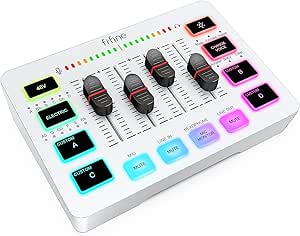 | Best for Stream-First Podcasts | Channels: 4 | Microphone input: XLR | Phantom power: 48 V | VIEW LATEST PRICE | See Our Full Breakdown |
| Cubilux CB5 USB Audio Interface – USB to 3.5 mm Sound Card with Stereo Mic Input, Line-In/Out and Headphone Jack, Supports Windows & macOS |  | Best Compact Multi-Input Hub | Channels: 3 | Inputs: Two stereo mic inputs and line-in | Outputs: Line-out and headphone jack | VIEW LATEST PRICE | See Our Full Breakdown |
| M-Audio M-Track Duo USB Audio Interface |  | Best for Two-Mic Starter Podcasts | Inputs: 2 combo XLR/line/instrument inputs | Preamps: Crystal preamps with phantom power | Audio resolution: 48 kHz | VIEW LATEST PRICE | See Our Full Breakdown |
| Audio-Technica AT-UMX3 USB Desktop Audio Mixer |  | Best for Desktop Loopback | Channels: 2 | Inputs: One microphone input (XLR or 1/4 inch), two line inputs, and USB-C | Maximum audio resolution: 24-bit/192 kHz | VIEW LATEST PRICE | See Our Full Breakdown |
| Focusrite Scarlett Solo 3rd Gen USB-C Audio Interface |  | Best for a Solo Host Seeking Recording Headroom | Channels: 2 | Audio inputs: XLR microphone and instrument | Recording resolution: 24-bit | VIEW LATEST PRICE | See Our Full Breakdown |
| Aveek 5-Channel Audio Mixer with USB Recording, Bluetooth, and 48V Phantom Power |  | Best for Hands-On Multi-Source Shows | Channels: 5 | Inputs: 3 XLR, 1/4-inch stereo, RCA stereo, USB, and Bluetooth | Outputs: RCA, 1/4-inch main, and 3.5 mm headphone | VIEW LATEST PRICE | See Our Full Breakdown |
| M-Audio M-Track Solo USB Audio Interface |  | Best Compact Single-Mic Pick | Inputs: One combo XLR/line input with phantom power and one switchable line/instrument input | Audio resolution: 48 kHz | Outputs: 1/8-inch headphone output and stereo RCA outputs | VIEW LATEST PRICE | See Our Full Breakdown |
| FIFINE AmpliGame SC3 Gaming Audio Mixer |  | Best for Simple, Soundboard-Style Podcasts | Channels: 4 | Connectivity: USB, XLR microphone input | Power: USB-C | VIEW LATEST PRICE | See Our Full Breakdown |
| FIFINE USB Audio Interface Mixer for Recording, Streaming, and Podcasting | 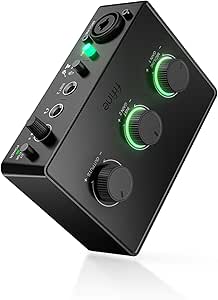 | Best for Mic-and-Instrument Recording | Model: SC1 | Channels: 3 | Inputs: XLR microphone and instrument | VIEW LATEST PRICE | See Our Full Breakdown |
| MAONO E2 Gen2 Podcast Audio Interface and Mixer |  | Best for Two-Host Portable Podcasts | Channels: 10 | Audio inputs: Bluetooth, 3.5 mm audio, XLR | XLR inputs: 2 combo inputs | VIEW LATEST PRICE | See Our Full Breakdown |
| MAONOCASTER G1 NEO Gaming Audio Mixer with XLR Input and 48V Phantom Power | 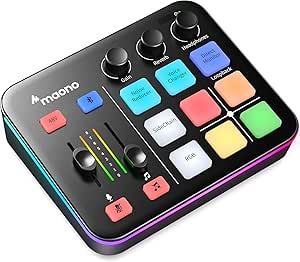 | Best Compact Streaming Mixer for Podcasters | Channels: 4 | Microphone input: XLR | Phantom power: 48 V | VIEW LATEST PRICE | See Our Full Breakdown |
| USB audio mixers for podcasting | Channels | Connectivity | Weight | Phantom power |
|---|---|---|---|---|
| MAONO P2 Hybrid USB Audio Inte | 2 | USB-C and USB | 0.5 kg | — |
| MAONO PS22 Lite USB Audio Inte | 2 | USB | 0.43 kg | 48 V |
| BOMGE BM-05 5-Channel Audio Mi | 5 | USB-B, USB-A, Bluetooth, and auxiliary | — | 48 V |
| FIFINE AmpliGame SC3W 4-Channe | 4 | USB and XLR microphone input | 8 oz | 48 V |
| Cubilux CB5 USB Audio Interfac | 3 | USB | 0.11 kg | — |
| M-Audio M-Track Duo USB Audio | — | — | — | — |
| Audio-Technica AT-UMX3 USB Des | 2 | — | 12 ounces | — |
| Focusrite Scarlett Solo 3rd Ge | 2 | — | — | — |
| Aveek 5-Channel Audio Mixer wi | 5 | — | — | 48 V |
| M-Audio M-Track Solo USB Audio | — | — | — | — |
| FIFINE AmpliGame SC3 Gaming Au | 4 | USB, XLR microphone input | 0.5 kg | 48 V |
| FIFINE USB Audio Interface Mix | 3 | USB | 500 g | 48 V |
| MAONO E2 Gen2 Podcast Audio In | 10 | AUX, Bluetooth, USB-C | 0.89 kg | — |
| MAONOCASTER G1 NEO Gaming Audi | 4 | Auxiliary, Bluetooth, USB | 1.2 lb | 48 V |
More Details on Our Top Picks
MAONO P2 Hybrid USB Audio Interface with Dual XLR Inputs
For a podcast built around two microphones, the MAONO P2 Hybrid gives each speaker an XLR input and up to 56 dB of gain, making it a more direct fit than the one-mic FIFINE AmpliGame SC3W. It also works with computers and mobile devices, so I’d shortlist it for creators who want to record at a desk or capture a remote-style setup on a phone or tablet. Direct monitoring helps speakers hear their input without relying on software playback, while loopback and routing features add flexibility for live streams. The tradeoff is that those software features may take setup, and its two channels leave little room for adding more microphones. Buyers who need more physical inputs may prefer the BOMGE BM-05, though its simultaneous-use limits call for scrutiny.
Pros:- Two XLR inputs support a two-microphone podcast setup.
- Up to 56 dB of gain accommodates microphones and instruments.
- Direct monitoring and loopback support recording and streaming workflows.
- USB-C and USB connectivity allow use with computers and mobile devices.
Cons:- Two channels limit expansion for larger roundtables.
- Software routing features may require extra setup.
Best for: Two-person podcast hosts who need dual XLR microphone inputs and want the option to record or stream from a computer, phone, or tablet.
Not ideal for: Growing shows that need more than two microphone channels or hosts who want a simple setup without configuring software routing.
- Channels:2
- XLR gain:56 dB
- Maximum sample rate:192 kHz
- Audio resolution:24-bit
- Connectivity:USB-C and USB
- Monitoring and routing:Direct monitoring and loopback
- Housing:Aluminum alloy
- Weight:0.5 kg
Our verdict“Choose the MAONO P2 if your podcast needs two XLR microphones and flexible device connections, but skip it if you expect to add more speakers.”
MAONO PS22 Lite USB Audio Interface for Guitar, Vocals, and Streaming
The MAONO PS22 Lite suits a new podcaster who wants a compact interface with the basics for one or two microphones, without stepping up to a broader control surface. Its 48 V phantom power supports condenser mics, and direct monitoring lets hosts hear their input while recording. Compared with the dual-XLR MAONO P2, it offers a similar two-channel, 24-bit/192 kHz recording ceiling in a smaller footprint, but the supplied details don’t establish the same range of mobile connections. Loopback and virtual channels can help combine sources for a stream, though using the interface with compatible software may require selecting the MAONO ASIO driver. That extra driver step is a practical drawback for beginners who expect every recording app to connect without configuration.
Pros:- 48 V phantom power supports condenser microphones.
- Direct monitoring helps hosts hear their input while recording.
- Loopback and virtual channels add routing options for streaming.
- Compact body and included USB cable support a small desk setup.
Cons:- Two channels restrict larger group podcast setups.
- Compatible software may require selecting the MAONO ASIO driver.
Best for: New solo or two-person podcasters who want phantom power, direct monitoring, and basic loopback in a compact USB interface.
Not ideal for: Hosts who need more than two channels or want to avoid selecting and configuring a dedicated audio driver in recording software.
- Channels:2
- Maximum sample rate:192 kHz
- Recording resolution:24-bit
- Microphone preamp gain:Up to 56 dB
- Phantom power:48 V
- Dynamic range:106 dB
- Connectivity:USB
- Weight:0.43 kg
Our verdict“Pick the PS22 Lite for a compact starter setup with phantom power and loopback, provided you’re comfortable with a possible driver-selection step.”
BOMGE BM-05 5-Channel Audio Mixer with USB, Bluetooth, Echo, and 48V Phantom Power
The BOMGE BM-05 is the input-heavy choice here: its listed connections include three XLR inputs plus stereo 6.35 mm and RCA pairs, a broader physical mix than the two-channel MAONO PS22 Lite. That can suit a podcast desk with several microphones, instruments, or playback sources, and its gain, two-band EQ, echo, and delay controls put basic adjustments on the mixer rather than solely in software. USB recording and headphone monitoring are useful podcast features, but the operating limits matter: USB, Bluetooth, and 4/5-channel functions cannot all run simultaneously. Bluetooth is also specified for a very short working distance, so I wouldn’t make it the core of a dependable recording chain. Compared with the FIFINE SC3W, this is aimed more at varied wired inputs than gaming-oriented voice effects.
Pros:- Three XLR inputs plus stereo 6.35 mm and RCA inputs support varied sources.
- 48 V phantom power is included.
- Gain and two-band EQ controls allow basic channel adjustments.
- USB recording, headphone monitoring, and speaker outputs support a desk setup.
Cons:- USB, Bluetooth, and 4/5-channel functions cannot be used simultaneously.
- Bluetooth is listed with a 1.5 ft working range and does not support Bluetooth output devices.
- Outputs require active speakers or other external equipment.
Best for: Podcast hosts who need several wired microphone or instrument connections and want onboard EQ and level controls.
Not ideal for: Creators who need all channels and USB or Bluetooth sources active at once, or who depend on wireless playback during recording.
- Channels:5
- Inputs:3 XLR; stereo 6.35 mm; stereo RCA
- Outputs:Stereo RCA and stereo 6.35 mm
- Connectivity:USB-B, USB-A, Bluetooth, and auxiliary
- Phantom power:48 V
- Effects:Echo and delay
- Controls:Two-band EQ and gain
- Headphone jack:3.5 mm
Our verdict“Choose the BM-05 when multiple wired sources and onboard controls matter more than unrestricted simultaneous use of every input and playback feature.”
FIFINE AmpliGame SC3W 4-Channel Gaming Audio Mixer
The FIFINE AmpliGame SC3W is a better match for a podcast that is also a live stream than for a recording-first show. Its four independently controlled channels, mute and volume controls, and real-time monitoring make it easier to manage a mixed desktop audio setup than the simpler MAONO PS22 Lite. It has one XLR microphone input with 48 V phantom power, though, so the four controls should not be mistaken for four microphone preamps. RGB lighting and voice effects fit a gaming-oriented stream, but they matter less to hosts focused on clean, edited conversation. The listed 3.5 mm output and corded power also shape the setup, while the product information gives only a limited frequency specification. For multiple XLR guests, the MAONO P2 is the more relevant fit.
Pros:- Four independently controlled channels help manage a mixed streaming setup.
- XLR microphone input includes 48 V phantom power.
- Mute, volume, and real-time monitoring controls are accessible on the mixer.
- Voice effects and RGB lighting suit gaming-oriented live content.
Cons:- Only one XLR microphone input is listed, limiting multi-host recording.
- Corded power makes the setup less portable.
- The listed frequency specification provides limited detail for judging recording performance.
Best for: Solo podcasters who livestream from a gaming or creator desk and want separate controls for several audio sources plus one XLR microphone.
Not ideal for: Multi-host shows that need several XLR microphone inputs or recording-focused buyers who have little use for RGB lighting and voice effects.
- Channels:4
- Microphone input:XLR
- Phantom power:48 V
- Connectivity:USB and XLR microphone input
- Output connector:3.5 mm audio
- Power source:Corded electric
- Weight:8 oz
- Warranty:1-year manufacturer warranty
Our verdict“Choose the SC3W for a stream-first podcast with one XLR mic and multiple desktop audio sources, not for a multi-microphone recording setup.”
Cubilux CB5 USB Audio Interface – USB to 3.5 mm Sound Card with Stereo Mic Input, Line-In/Out and Headphone Jack, Supports Windows & macOS
The Cubilux CB5 takes a different approach from the XLR-centered MAONO P2: it’s a small, bus-powered USB hub with two stereo mic inputs, line-in, line-out, and a headphone jack. That mix may suit a compact laptop podcast station using compatible 3.5 mm sources, and the listed independent multi-track naming can help keep channels identifiable in recording software. Its stated maximum of 192 kHz/32-bit is a high-resolution capture specification, but it doesn’t make this the obvious pick for conventional XLR podcast microphones; the supplied details don’t list XLR inputs or phantom power. The output limitation also affects monitoring: line-out and headphones cannot be used simultaneously. Compared with the BOMGE BM-05, it is far more portable and simpler, but offers fewer connection types and mixer controls.
Pros:- Bus-powered design avoids a separate power supply.
- Two stereo mic inputs and line-in provide several connection options.
- Supports up to 192 kHz/32-bit capture according to the product data.
- Independent multi-track naming can help identify channels in recording software.
Cons:- No XLR input or phantom power is listed for conventional podcast microphones.
- Line-out and headphone jack cannot be used simultaneously.
- Listed for Windows and macOS rather than mobile operating systems.
Best for: Laptop-based podcasters who use compatible 3.5 mm microphones or line-level sources and want a compact, bus-powered hub.
Not ideal for: Hosts using XLR condenser microphones, needing phantom power, or wanting headphone monitoring and line-out at the same time.
- Channels:3
- Inputs:Two stereo mic inputs and line-in
- Outputs:Line-out and headphone jack
- Maximum sample rate:192 kHz
- Audio resolution:32-bit
- Connectivity:USB
- Compatible operating systems:Windows and macOS
- Weight:0.11 kg
- Warranty:1 year
Our verdict“Pick the CB5 for a portable laptop setup built around 3.5 mm sources, but choose an XLR interface if your podcast microphones need phantom power.”
M-Audio M-Track Duo USB Audio Interface
I’d choose the M-Track Duo when a simple two-person podcast needs two microphone-capable inputs without the extra routing of a full desktop mixer. Its two combo inputs accept microphones, instruments, or line-level sources, and phantom power supports compatible condenser mics. Compared with the single-preamp Scarlett Solo 3rd Gen, it can accommodate two mic sources at once; the Scarlett offers higher-resolution recording and Air mode instead. USB power and zero-latency direct monitoring keep the setup portable and let speakers hear themselves without distracting delay. The tradeoff is a 48 kHz ceiling and a more basic connection set than the Audio-Technica AT-UMX3, which adds loopback for mixing computer audio. I’d skip this if the show needs built-in effects or more hands-on control.
Pros:- Two combo inputs accept microphones, instruments, and line-level sources
- Phantom power supports compatible condenser microphones
- USB-powered design and direct monitoring suit portable recording
- MPC Beats and Ableton Live Lite are included
Cons:- Audio resolution is limited to 48 kHz
- iOS use requires a separate Lightning to USB 3 Camera Adapter
- The 1/4-inch headphone output may need an adapter for some headphones
Best for: Two-person podcast hosts who need two mic inputs, direct monitoring, and a compact interface for Mac or PC.
Not ideal for: Podcasters who need loopback, onboard effects, more than two inputs, or higher-resolution recording than 48 kHz.
- Inputs:2 combo XLR/line/instrument inputs
- Preamps:Crystal preamps with phantom power
- Audio resolution:48 kHz
- Outputs:Stereo 1/4-inch outputs and 1/4-inch headphone output
- Monitoring:Zero-latency direct monitoring with adjustable USB/direct balance
- Power:USB-powered
- Supported software:Ableton Live Lite and MPC Beats
Our verdict“Choose the M-Track Duo for a portable two-mic podcast setup; pick the Scarlett Solo for one mic and higher-resolution recording.”
Audio-Technica AT-UMX3 USB Desktop Audio Mixer
The AT-UMX3 is the most compelling fit here for a desktop podcast that blends a live microphone with audio playing on a computer. Its loopback mixing makes that combination practical for remote interviews, livestreams, or shows with clips, without adding a separate routing device. It also supports 24-bit/192 kHz conversion and connects to computers or mobile devices without special drivers. Compared with the two-mic M-Audio M-Track Duo, though, it has only one microphone input, so it suits a solo host better than a co-host setup. The Aveek 5-Channel Mixer offers more XLR inputs and onboard effects, but takes a more hands-on approach and has operating-mode limits. The AT-UMX3’s compact footprint is useful on a crowded desk; its two-channel design limits expansion.
Pros:- Loopback mixes microphone and instrument inputs with computer audio
- Supports audio conversion up to 24-bit/192 kHz
- Driver-free connection to computers and mobile devices
- Compact desktop format
Cons:- Only one microphone input
- USB connection uses USB Type B
- Software update support date is listed as unknown
Best for: Solo podcasters and livestreamers who need to combine a microphone with computer audio through loopback.
Not ideal for: Two-host shows needing separate microphone preamps, or creators seeking a multi-input mixer with onboard effects.
- Channels:2
- Inputs:One microphone input (XLR or 1/4 inch), two line inputs, and USB-C
- Maximum audio resolution:24-bit/192 kHz
- Loopback:Mixes microphone and instrument inputs with computer audio
- Output connectors:TRS and USB Type B
- Dimensions:5.2 × 5 × 1.7 inches
- Weight:12 ounces
- Warranty:2 years
Our verdict“Pick the AT-UMX3 for simple desktop loopback with one mic, but choose the M-Track Duo if two microphones matter more.”
Focusrite Scarlett Solo 3rd Gen USB-C Audio Interface
For a solo host who wants an interface focused on clean vocal capture rather than mixer-style controls, I’d put the Scarlett Solo 3rd Gen ahead of the more basic M-Audio interfaces. It records up to 24-bit/192 kHz, and its Gain Halo metering gives a clear visual cue when setting levels—helpful for avoiding clipped speech before recording. Switchable Air mode adds a tonal option for vocals, while balanced monitor outputs suit a desk with studio speakers. Compared with the M-Track Duo, the Scarlett has only one microphone preamp, so it is a weaker choice for two-host shows; the Duo trades resolution and vocal features for a second combo input. This bundle includes recording software and effects, but they require registration and download. I’d skip it if you need loopback or multiple mic channels.
Pros:- Records at up to 24-bit/192 kHz
- Gain Halo metering helps set input levels
- Switchable Air mode provides an alternate vocal character
- Balanced monitor outputs and a three-year warranty
Cons:- Only one microphone preamp
- Software bundle requires registration and download
- Does not provide the loopback mixing found on the Audio-Technica AT-UMX3
Best for: Solo podcasters recording one microphone at a time who want detailed level feedback, Air mode, and high-resolution capture.
Not ideal for: Co-hosted podcasts requiring two mic preamps, or creators who want loopback and mixer-style routing.
- Channels:2
- Audio inputs:XLR microphone and instrument
- Recording resolution:24-bit
- Maximum sample rate:192 kHz
- Monitoring:Gain Halo metering, headphone output, and balanced monitor outputs
- Compatible operating systems:Mac OS, Windows OS, and iOS
- Dimensions:1.71 × 5.65 × 3.77 inches
- Warranty:3 years
Our verdict“Choose the Scarlett Solo for a feature-rich single-mic recording chain; choose the M-Track Duo when a second microphone is needed.”
Aveek 5-Channel Audio Mixer with USB Recording, Bluetooth, and 48V Phantom Power
The Aveek 5-Channel Mixer suits podcasters who want physical control over several sources, rather than the stripped-down interface format of the Scarlett Solo. With three XLR inputs, stereo inputs, headphone monitoring, and 48 V phantom power, it can bring microphones and playback sources into one setup. Its onboard EQ, gain, echo, and delay controls offer more immediate shaping than the M-Track Duo, which focuses on recording and direct monitoring. That flexibility comes with a catch: USB, Bluetooth, and 4/5-channel functions cannot run simultaneously, limiting how freely sources can be combined. Bluetooth is for streaming audio in, not sending sound to Bluetooth speakers, and the unit needs powered speakers or an amplifier. I’d choose it for a fixed multi-source desk, not for a minimalist portable recording kit.
Pros:- Three XLR inputs with 48 V phantom power
- Accepts stereo sources through 1/4-inch and RCA inputs
- Onboard 2-band EQ, gain, echo, and delay controls
- Includes USB recording and playback plus headphone monitoring
Cons:- USB, Bluetooth, and 4/5-channel functions cannot be used simultaneously
- Bluetooth output devices are not supported
- Requires active speakers or a power amplifier
Best for: Podcast hosts running several microphones and stereo playback sources who want physical EQ, effects, and headphone monitoring.
Not ideal for: Creators who need simultaneous USB, Bluetooth, and full-channel operation, Bluetooth speaker output, or a bus-powered portable setup.
- Channels:5
- Inputs:3 XLR, 1/4-inch stereo, RCA stereo, USB, and Bluetooth
- Outputs:RCA, 1/4-inch main, and 3.5 mm headphone
- Phantom power:48 V
- Effects and controls:2-band EQ, gain, echo, and delay
- Bluetooth range:Up to 15 feet
- Dimensions:8.27 × 8.27 × 2.56 inches
- Power:Corded electric
Our verdict“Choose the Aveek for hands-on control of multiple sources, but pick a compact interface if you prioritize straightforward USB recording.”
M-Audio M-Track Solo USB Audio Interface
The M-Track Solo is the simplest fit in this group for a one-person podcast setup where portability and basic monitoring matter more than expansion. Its combo input handles a microphone or line source, while the switchable second input can take a line or instrument signal. Zero-latency direct monitoring helps a host hear their mic without distracting delay, and USB power keeps the kit light for recording away from a desk. Compared with the M-Track Duo, it gives up a second combo input, making two-mic interviews a poor match; compared with the Scarlett Solo, it has a lower 48 kHz resolution ceiling and fewer vocal-focused features. The tradeoff is straightforward operation at the expense of room to grow. I’d skip it for shows that need multiple mic preamps or onboard loopback.
Pros:- Compact, USB-powered design for portable recording
- Combo input with phantom power supports condenser microphones
- Zero-latency direct monitoring with USB/Direct mix control
- Includes MPC Beats and Ableton Live Lite
Cons:- Only one microphone-capable combo input
- Audio resolution is limited to 48 kHz
- iOS connection requires a separate Lightning to USB 3 Camera Adapter
Best for: Solo podcasters and mobile creators who need one microphone input, a separate instrument or line input, and direct monitoring.
Not ideal for: Two-host shows, users seeking higher-resolution recording, or podcasters who need loopback and built-in mixer controls.
- Inputs:One combo XLR/line input with phantom power and one switchable line/instrument input
- Audio resolution:48 kHz
- Outputs:1/8-inch headphone output and stereo RCA outputs
- Monitoring:Zero-latency direct monitoring with USB/Direct mix switch
- Power:USB-powered
- Supported software:Ableton Live Lite and MPC Beats
- Operating systems:Windows 7–10, macOS High Sierra–Big Sur, and iOS with Lightning to USB 3 Camera Adapter
Our verdict“Choose the M-Track Solo for a straightforward portable one-mic setup; step up to the M-Track Duo for two microphone inputs.”
FIFINE AmpliGame SC3 Gaming Audio Mixer
The FIFINE AmpliGame SC3 suits solo podcasters who want hands-on control of a microphone, playback, and sound effects without a larger production desk. Its four independently controlled channels, mute and monitoring buttons, and customizable effects make it easier to manage live segments than a basic interface such as the FIFINE SC1, which focuses more on a mic-and-instrument recording setup. The SC3 also supplies 48 V phantom power for compatible XLR condenser microphones and connects to Windows or macOS over USB-C.
The tradeoff is its narrow mic compatibility: it accepts an XLR microphone, not a USB mic, and the XLR cable is not included. Its gaming-oriented effects and RGB lighting may matter less for edited, audio-only shows, while the SC1 is a more natural fit if recording an instrument is part of the plan.
Pros:- Four independently controlled channels help separate microphone and playback levels.
- 48 V phantom power supports compatible condenser microphones.
- Mute, monitoring, and customizable sound effect controls suit live podcast segments.
- USB-C plug-and-play support works with Windows and macOS.
Cons:- Does not support USB microphones.
- XLR cable is not included.
- Gaming effects and RGB lighting add less value for a simple, edited audio-only workflow.
Best for: Solo podcasters with an XLR microphone who want physical channel controls, quick muting, and sound effects for live or conversational shows.
Not ideal for: USB-microphone owners or podcasters who need multiple XLR mic inputs, since this mixer has one XLR microphone input and does not support USB microphones.
- Channels:4
- Connectivity:USB, XLR microphone input
- Power:USB-C
- Phantom power:48 V
- Outputs:3.5 mm line out, 3.5 mm headphone jack
- Compatible operating systems:Windows, macOS
- Dimensions:4.44 × 6.45 × 1.6 in
- Weight:0.5 kg
Our verdict“Choose the SC3 for a one-mic podcast setup that benefits from quick sound effects and channel controls, but skip it if you need multiple XLR inputs or USB-mic support.”
FIFINE USB Audio Interface Mixer for Recording, Streaming, and Podcasting
The FIFINE SC1 is the straightforward pick for a podcaster who also records an instrument: it accepts an XLR microphone and an instrument, with separate gain, playback, and direct-monitoring controls. That makes it a better match for a voice-and-guitar workflow than the FIFINE AmpliGame SC3, whose appeal is its sound effects and live channel handling rather than instrument input. Its 48 V phantom power accommodates compatible condenser mics, and USB connectivity supports Mac and PC.
Its limits are just as clear. There is only one XLR microphone input, so it is not built for two-host recording, and it lacks the SC3’s customizable soundboard controls. The listed maximum sample rate is 192 kHz, but that figure alone does not make this a multitrack production mixer; buyers should check that their recording software supports USB audio devices.
Pros:- Accepts both an XLR microphone and an instrument.
- 48 V phantom power supports compatible condenser microphones.
- Direct monitoring and separate gain and playback controls aid recording.
- USB connection supports Mac and PC.
Cons:- Only one XLR microphone input limits multi-host recording.
- Requires software that supports USB audio devices.
- Does not offer the sound effects and live-production controls found on the SC3.
Best for: Solo podcasters who want to record an XLR mic alongside a guitar or other instrument and monitor their input directly.
Not ideal for: Two-host shows or soundboard-heavy live podcasts, since it has one XLR mic input and fewer performance-oriented controls than the SC3 or MAONO E2 Gen2.
- Model:SC1
- Channels:3
- Inputs:XLR microphone and instrument
- Phantom power:48 V
- Maximum sample rate:192 kHz
- Connectivity:USB
- Compatible operating systems:Mac, PC
- Dimensions:5.51 × 6.3 × 1.97 in
- Weight:500 g
Our verdict“Pick the SC1 if your podcast setup pairs one XLR voice mic with an instrument; choose a dual-mic model for co-hosts.”
MAONO E2 Gen2 Podcast Audio Interface and Mixer
For a two-person show, the MAONO E2 Gen2 offers a more podcast-focused mix of inputs and live controls than the single-XLR FIFINE SC1. Its two XLR combo inputs and preamps with up to 60 dB of gain give hosts separate mic connections, while loopback, one-touch mute, and eight customizable sound buttons help manage remote audio and recurring show cues. Bluetooth and AUX add ways to bring in a phone or other playback source, and its built-in battery rated for up to 8 hours makes recording away from a desk more practical.
This flexibility comes with a larger feature set to manage than a basic interface, and its maximum sample rate is 48 kHz. Unlike a simple USB-powered desk unit, the E2 Gen2 also cannot charge a connected phone or provide power delivery. Choose it for mobile, interactive episodes; for a simpler mic-and-instrument setup, the SC1 is more direct.
Pros:- Two XLR combo inputs accommodate a pair of hosts.
- Preamps provide up to 60 dB of gain.
- Loopback, mute, voice effects, and eight customizable sound buttons support live production.
- Built-in battery is rated for up to 8 hours of use.
Cons:- Maximum sample rate is 48 kHz.
- Does not support phone charging or power delivery.
- Its extra live-production functions may be unnecessary for a simple single-mic recording setup.
Best for: Two-host podcast teams who need separate XLR mic inputs, sound cues, loopback, and the option to record away from a fixed desk.
Not ideal for: Podcasters who only need one mic and straightforward recording, or those who expect the mixer to charge a phone during a session.
- Channels:10
- Audio inputs:Bluetooth, 3.5 mm audio, XLR
- XLR inputs:2 combo inputs
- Maximum preamp gain:60 dB
- Maximum sample rate:48 kHz
- Connectivity:AUX, Bluetooth, USB-C
- Battery life:Up to 8 hours
- Compatible operating systems:Windows, macOS
- Weight:0.89 kg
Our verdict“Choose the E2 Gen2 for a portable two-host show that uses live cues or loopback, but pick a simpler interface if you only record one mic.”
MAONOCASTER G1 NEO Gaming Audio Mixer with XLR Input and 48V Phantom Power
The MAONOCASTER G1 NEO fits podcasters who stream from a compact desk and want one-touch production features close at hand. It combines an XLR input with 48 V phantom power, direct monitoring, loopback, Bluetooth input, noise reduction, voice effects, and sound pads. Compared with the MAONO E2 Gen2, it is a more gaming-oriented, single-XLR option rather than a dual-host portable mixer; the E2 Gen2 is the stronger fit for two microphones and battery-powered recording. The G1 NEO’s compatibility with common streaming platforms and PS4 and PS5 can also suit creators who record alongside gameplay.
Its clear limitation is mic capacity: one XLR input does not serve a two-host show, and USB microphones and Xbox are unsupported. It requires a 5 V supply, with the included adapter recommended for stable performance during demanding sessions. Its effects and RGB focus make less sense for an audio-only podcast with no live elements.
Pros:- XLR preamp and 48 V phantom power support compatible condenser microphones.
- Loopback and direct monitoring help combine and check audio during live sessions.
- Noise reduction, voice effects, and sound pads add quick production controls.
- Bluetooth input and compatibility with PS4 and PS5 suit streaming setups.
Cons:- Only one XLR microphone input limits co-host recording.
- Not compatible with USB microphones or Xbox.
- The included 5 V power adapter is recommended for stable performance during demanding sessions.
Best for: Solo podcasters who stream from a computer or PS4/PS5 and want a compact mixer with loopback, monitoring, and live voice or sound effects.
Not ideal for: Co-hosted podcasts, USB-mic users, and Xbox streamers, since it has one XLR input and does not support USB microphones or Xbox.
- Channels:4
- Microphone input:XLR
- Phantom power:48 V
- Connectivity:Auxiliary, Bluetooth, USB
- Outputs:3.5 mm, USB-C
- Power:5 V corded electric
- Compatible devices:Phones, computers, tablets, PS4, PS5
- Dimensions:6.29 × 2 × 5.19 in
- Weight:1.2 lb
Our verdict“Choose the G1 NEO for a solo, game-linked podcast or stream with live effects; skip it if your show needs two mics or an Xbox connection.”

How We Picked
I evaluated these devices based on audio transparency, input versatility, and workflow efficiency. For podcasting, the preamp quality matters more than sample rate specs, so I prioritized units with clean gain stages and low self-noise floors. I also assessed how easily each device integrates into common recording environments, looking specifically at driver stability on Windows and macOS, as well as the intuitive nature of any accompanying software or physical controls.
Ranking was determined by balancing value proposition against technical limitations. Devices that required excessive external hardware (like separate headphone amps or phantom power supplies) were penalized unless their core audio quality justified the extra steps. I favored units that offered direct monitoring without latency, as this is essential for real-time vocal performance during interviews.
Factors to Consider When Choosing USB Audio Mixers For Podcasting
Selecting a USB audio mixer involves more than just counting inputs. You must consider how the device fits into your existing recording chain and whether its controls match your editing style.Input Types and Phantom Power Requirements
The most common mistake podcasters make is buying a mixer that cannot power their desired microphone. Dynamic microphones typically do not need phantom power, but condenser microphones require 48V phantom power to function. Many entry-level USB interfaces lack this feature, forcing you to buy a separate preamp or switch to a USB microphone, which defeats the purpose of having a mixer. Always verify that the XLR inputs on your chosen device include a phantom power switch if you plan to use high-end condenser mics. If you stick to dynamic mics like the SM7B, you might need a Cloudlifter or similar inline preamp, as some budget mixers do not provide enough clean gain on their own.
Direct Monitoring vs. Software Mixing
Podcasters need to hear themselves and their guests without delay. Direct monitoring allows you to hear the input signal before it hits the computer, eliminating latency. However, this often means you are hearing a raw, unprocessed signal. If you want to hear effects like compression or EQ in real-time, you need a mixer with onboard DSP or low-latency software routing. Dedicated podcast mixers often include physical knobs for real-time gain adjustment, allowing you to fix level issues during the recording rather than in post-production. This operational difference is major: interfaces require software discipline, while mixers allow tactile control.
Software Ecosystem and Driver Stability
Hardware is only half the equation; the software controlling it can make or break your session. Some manufacturers offer robust control panels that allow for complex routing, such as sending different mixes to your recording software and your stream chat. Others provide minimal or no software, relying entirely on the operating system’s audio settings. Poor driver stability can lead to dropouts or crashes during critical recordings. I recommend checking forums for reports on ASIO driver performance for Windows users and Core Audio compatibility for macOS. A mixer with intuitive software can save hours of troubleshooting, especially when integrating with platforms like Zoom or Riverside.
Scalability and Future-Proofing
Consider how your podcast format might evolve over the next two years. A single-input interface is sufficient for a solo monologue but becomes a bottleneck the moment you add a co-host. Look for devices with at least two XLR inputs and a stereo line-in for music beds or remote audio feeds. Some mixers offer expandability via optical or ADAT connections, though this is rare in the USB category. Buying a unit that matches your current needs exactly often leads to premature upgrades. It is frequently more cost-effective to buy a slightly higher-tier mixer with four channels than to buy a two-channel unit and replace it within a year.
Portability and Build Quality
If you travel for your podcast, build quality and size become primary factors. Plastic enclosures may crack under travel stress, while metal chassis units are heavier but more durable. Check if the device is bus-powered via USB-C, which reduces the number of cables you need to carry. Some mixers have a footprint that is too large for small mobile setups, clashing with laptop keyboards. Additionally, consider the placement of ports; rear-facing jacks are better for cable management in a studio, while front-facing jacks are convenient for quick guest swaps. The ideal balance depends on whether your setup is stationary or mobile.
Frequently Asked Questions
Do I need a mixer if I only record solo podcasts?
If you record solo and use a single microphone, a dedicated mixer is often unnecessary. A simple USB audio interface like the Focusrite Scarlett Solo is typically sufficient and offers better preamp quality per dollar. Mixers add value when you need to manage multiple audio sources, such as music beds, remote guests, or multiple local microphones. However, if you prefer physical knobs to adjust your vocal level in real-time without touching your mouse, a small mixer like the MAONO E2 can enhance your comfort during long recording sessions.
Why is my USB mixer producing a hum or buzz?
Hum and buzz are usually caused by ground loops or poor shielding in USB cables. Try using a USB isolator or powering your mixer from a different outlet than your computer. Ensure your microphone cables are balanced XLR cables; unbalanced cables can pick up electromagnetic interference. If the noise persists, check if your mixer’s gain staging is too high, as this amplifies background noise. Replacing cheap USB cables with shielded ones often resolves the issue without requiring new hardware.
Can I use a gaming mixer for professional podcasting?
While possible, gaming mixers often prioritize chat volume and game audio over raw audio fidelity. They may have lower-quality preamps and less precise gain controls, which can result in a less professional sound. Gaming mixers also tend to have complex software overlays that can interfere with DAWs (Digital Audio Workstations). For professional podcasting, dedicated audio interfaces or podcast-specific mixers provide cleaner signals and more reliable drivers. Only use a gaming mixer if you are also streaming and need the specific chat/game balance features.
Is USB-C better than USB-A for audio mixers?
USB-C itself does not inherently improve audio quality, but it often indicates a newer device with better power delivery and data bandwidth. Newer mixers using USB-C may support higher sample rates or more simultaneous channels. However, a well-designed USB-A interface can perform just as well as a USB-C one. The connector type matters more for convenience and future-proofing your cable setup. Ensure your computer supports USB-C or that you have a high-quality adapter if you choose a USB-C mixer.
How do I reduce background noise with a USB mixer?
A mixer alone cannot remove background noise; you need proper gain staging and microphone placement. Set your mixer’s gain so your voice peaks around -12dB to -6dB, leaving headroom for processing. Use a noise gate or noise reduction plugin in your recording software, which can be triggered more effectively with a clean signal. Some modern mixers include onboard DSP with noise gates, which can process the signal before it reaches your computer. Always prioritize treating your room acoustically before relying on hardware features.
Conclusion
Choosing the right USB audio mixer comes down to your specific workflow needs. For the best overall performance and audio fidelity, the Focusrite Scarlett Solo 3rd Gen remains the industry standard for solo podcasters seeking clean sound. If you need plug-and-play simplicity with physical controls, the MAONO P2 Hybrid offers an excellent balance of ease and quality. For budget-conscious beginners, the MAONO PS22 Lite provides essential features without unnecessary complexity. Those requiring multiple inputs for interviews should look at the Audio-Technica AT-UMX3 for its robust channel management. Finally, if you are heavily integrated into gaming or streaming, the FIFINE AmpliGame SC3W offers specialized routing that standard podcast mixers lack.
Halloween Picks
halloween
As an affiliate, we earn on qualifying purchases.